How to Write a Daily Activity Report (DAR) That Matters: A Guide for Security Teams

Trackforce
November 3, 2026 · 9 min read

A daily activity report (DAR) is a written record of what a security officer did, saw and handled during a shift. For most clients, it is the only proof of the work happening on their property. A clear, accurate DAR builds trust and supports contract renewals. A vague one raises doubts about the service behind it.
Points clés à retenir
- A DAR is a time-stamped record of a security officer’s shift, including patrols, observations, incidents and responses.
- Specific entries build client trust. Notes like “Code 4” or “all is well” say nothing about the work completed.
- Accurate arrival, departure and event times matter most, because reports can be challenged in legal proceedings.
- Logging in real time on a mobile device produces cleaner records than rebuilding a shift from memory.
- TrackTik by Trackforce combines guided incident reporting, time-stamped photo, video, audio and GPS evidence, and ReportPro AI writing assistance in one platform.
What Is a Daily Activity Report (DAR) in Security?
A daily activity report is a chronological log of everything a security officer does and observes during a shift. It records patrols, checks, alarms, incidents and handoffs, each with a time. Clients rarely see the work happen, so the DAR is often the main evidence of the service they pay for.
How Is a DAR Different From an Incident Report?
A DAR covers the whole shift. An incident report documents one specific event in depth, such as a theft, an injury or a trespass. The two work together: the DAR notes that an incident occurred and when, and the incident report holds the full account, evidence and follow-up.
Why Do Daily Activity Reports Matter?
They Represent Your Work to the Customer
Most customers never see the patrols, checks and responses that keep their property secure. They see the DAR. A sloppy or incomplete report leads them to assume the work behind it is just as careless. A detailed log of every incident and your response builds trust and confidence in your team.
They Protect Your Team Legally
A DAR may one day be reviewed in a legal proceeding, where every entry can be challenged. Inaccurate time logs can undermine the rest of your notes and create legal exposure for your company and your client. Recording the small details, not only the big incidents, gives you a record that holds up.
They Support Customer Retention
A high-quality DAR is one of the strongest tools for keeping clients. It shows the service is working, even on shifts when nothing went wrong.
They Show You What to Improve
Logging routine activity reveals which tasks are being missed and which processes could run better. If you do not know what is being done today, you cannot improve it tomorrow. Platforms with business intelligence and analytics make those patterns easier to spot across sites.
What Should a Daily Activity Report Include?
A strong DAR answers who, what, when and where for every entry. Use this checklist as a baseline and adjust it to your contract requirements.
| Element | Ce qu'il faut enregistrer | Pourquoi est-ce important ? |
|---|---|---|
| Officer and site details | Officer name, post, site and shift | Ties the report to a specific person and location |
| Arrival and departure times | Exact start and end of the shift, and any post changes | Anchors every other entry and supports the record if challenged |
| Patrols and checks | What was inspected, such as perimeter, fencing, doors and valuable assets | Proves the work was done and shows the client what they receive |
| Observations | Anything unusual, even if minor | Surfaces patterns and potential risks early |
| Incidents and responses | What happened, who was involved, actions taken and outcome | Creates a defensible account of the event |
| Éléments de preuve | Time-stamped photos, video, audio and GPS location | Strengthens credibility and reduces disputes |
| Handoff notes | Open items for the next shift or supervisor | Keeps continuity between shifts |
How Do You Write a Daily Activity Report Step by Step?
- Log arrival and departure times as they happen. Record the exact time, down to the second where your system allows. Accurate time logs support every other entry.
- Record each activity in real time. Enter patrols, checks and events as they occur rather than reconstructing them at the end of the shift.
- Replace generic notes with specifics. Name what you checked and what you found. List the perimeter, the fence line and the key assets you inspected.
- Document incidents completely. Capture what happened, who was involved, when and where it occurred, and how you responded.
- Attach evidence. Add time-stamped photos, video, audio and location data wherever they support the record.
- Keep the language factual. Describe what you saw and did, not assumptions or opinions.
- Review and submit on time. Check the report for gaps or errors, then share it with your supervisor and client on the agreed schedule.
Weak vs. Strong DAR Entry
| Début timide | Un début en force |
|---|---|
| 02:15 Code 4 | 02:15 Completed perimeter check. Fence line intact, gates locked, loading dock secured. Inspected generator and fuel storage. No unauthorized vehicles in the lot. |
What Are the Most Common DAR Mistakes to Avoid?
Relying on “Code 4” or “All Is Well”
These notations confuse customers, managers and anyone unfamiliar with the shorthand, and they deliver no value. Describe the checks you completed instead. The extra detail shows your effort, removes discrepancies and helps protect you from liability.
Logging From Memory After the Shift
Reconstructing a shift later invites errors in times and details. Paperless systems that update from a mobile device let officers enter information as it happens.
Leaving Out Small Details
You never know which entry will matter later. Minor observations can become important if an incident develops, and they reveal gaps in your processes.
Using Vague or Inconsistent Times
Rounded or missing times weaken the whole report. Precise timestamps make the rest of your notes more credible.
How Does TrackTik by Trackforce Improve Daily Activity and Incident Reporting?
TrackTik by Trackforce replaces clipboards and end-of-shift paperwork with guided digital reporting that officers complete in the field. Every report is backed up, time-stamped and ready to share with your team and your clients.
Guided, In-Tour Incident Reporting
TrackTik walks officers through each report step by step so no detail is missed. Reports are filed from the device during the tour, so guards never leave their post. Forms can be configured to match the requirements of any contract. See how it works in TrackTik security incident reporting.
Time-Stamped Photo, Video, Audio and GPS Evidence
Every report can include verified, time-stamped media and location data. This produces a complete, credible record that is built to hold up, even in litigation.
Scheduled and Mandatory Reports
When a contract or regulation requires consistent reporting, reports can be scheduled for hourly, daily, monthly or annual completion. Automatic email or text notifications keep your team and stakeholders informed, and issues can be escalated to clients and third parties when required.
ReportPro AI for Faster, Clearer Reports
ReportPro AI is built into TrackTik incident reporting and turns rough field notes into clear, compliance-ready reports. Supervisors can generate executive summaries on demand to speed review and client communication. Every AI-assisted change is logged, with the original and enhanced text stored side by side for a defensible audit trail.
Real-Time Visibility Across Your Operation
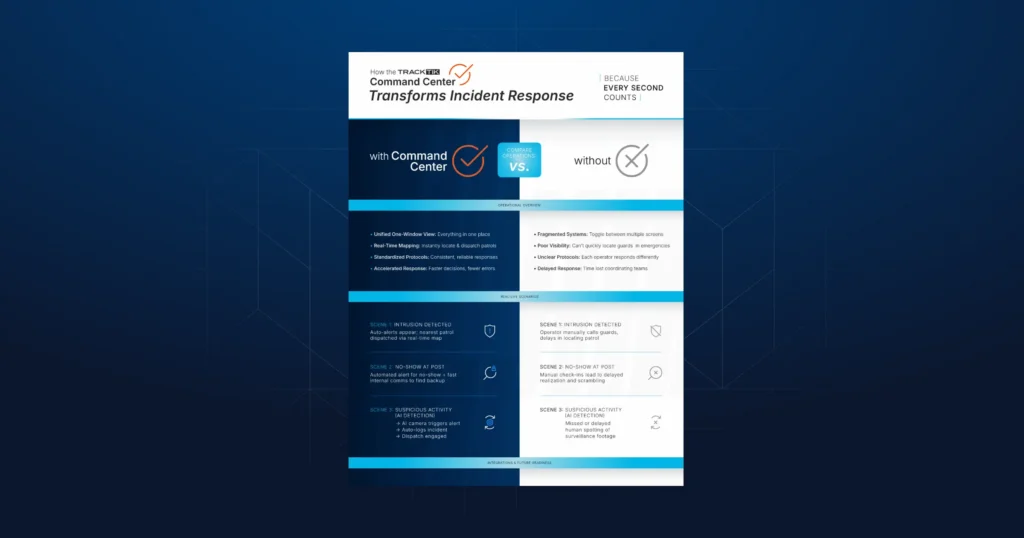
The Security Command Center brings alerts, patrol tracking, incident management and guard dispatch into a single real-time view. Reporting also connects with guard management, the security guard tour system, mobile patrol management and the wider security operations platform. The security guard app works on both Android and iOS devices, so teams can keep the hardware they already own.
Benefits at a Glance
| Fonctionnalité | Benefit |
|---|---|
| Guided in-tour reports | Complete records without leaving the post |
| Time-stamped media and GPS | Credible, litigation-ready documentation |
| Scheduled reports and alerts | Contract and regulatory reporting stays on track |
| ReportPro IA | Less time on paperwork and consistent report quality |
| Automatic backups and real-time access | Reports available to your team at a moment’s notice |
| Historical report data | Benchmarking and operational standards over time |
See How TrackTik Supports Daily Activity Reporting
See how TrackTik supports daily activity reporting with guided in-tour reports, time-stamped evidence and ReportPro AI. Get a demo to see it in action with your own sites and workflows.
Frequently Asked Questions About Daily Activity Reports

Free guide
Stop rewriting reports: your guide to AI-powered incident reporting
Derniers articles

Ressources à la une



Découvrez Trackforce en action
Prenez rendez-vous avec notre équipe pour une démonstration et découvrez comment cette solution s'adapte à votre activité.