Should Security Companies Charge for the Use of Guard Management Software?

Trackforce
July 25, 2018 · 9 min read
The use of guard management software continues to increase in popularity across the security industry. Which begs the question, should security companies charge clients more for the use of technology?
Or better yet, how should security companies charge clients for the use of technology?
We absolutely recommend passing on the cost of a guard management solution. It’s a cost for doing business, so it should be accounted for as you prepare your proposals and bids.
This week we get real practical, showing you a few ways to present your costs along with the pros and cons of each method.
Key takeaways
- Software is a cost of doing business.
Account for it in every bid, just like uniforms, insurance and supervision. - Making it optional puts the account at risk.
Clients who decline the software leave you with slower, more labor-intensive manual processes. - There are three ways to present the cost.
A flat monthly fee, an hourly add-on or building it into the hourly rate. - Building it into the hourly rate works best.
You recover the cost, every site runs on the system and the client sees the software as included. - Know your true cost per guard hour.
Divide your monthly software, device and data costs for a site by its monthly guard hours.
But before we dive in, you have to decide if you want to give the client the option to use, or not use, the software at their site.
Should You Give Your Clients the Option?
If you present the cost of the software as an up-sell, or an optional fee, you risk the client opting not to use it.
In most situations manual reporting processes like handwritten reports, emailed reports, or Deggy systems actually cost a security company more time and money than a guard management solution.
With a manual system you have to account for:
- Additional time collecting and distributing reports
- Time visiting the site for random post inspections
- Longer training times
- Time spent recovering past reports when needed
In addition, you lose out on tools like GPS, Guard Tours, or Performance alerts that help you identify underperforming officers, which put the account at risk.
So before deciding how to present the cost to your client, decide if having the solution on site is an option. We cover this choice in more depth in should I use security reporting software as an upsell or a value add?.
If you are going to provide the client with the option of using (or not using) the software, there are two ways to present that cost to the client.
Option 1: A Flat Monthly Fee
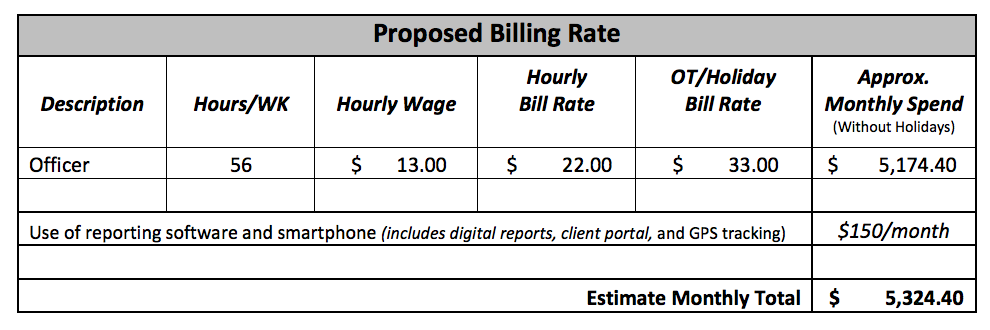
The first way you can present the cost to the client is in a flat monthly fee.
Most of the time we see companies taking the cost of the phone, data plan, and software and marking it up between 30-50%.
Here is an example of what this would look like in a proposal:
Pros of a flat monthly fee
- Option one is simple and easy for the client to understand.
- It provides a return on the use of the software.
Cons of a flat monthly fee
- The client can decline the software, causing you to deal with a more labor intensive approach to management.
Option 2: Added as an Hourly Rate
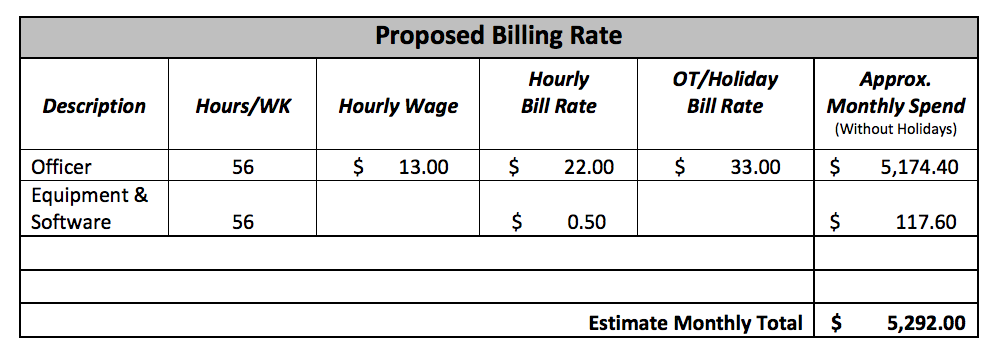
The second way you can present the cost to the client is as an add-on to the hourly rate.
This is my least favorite approach, but I’ve included it in this post because it’s an approach we see used quite often.
Here is an example of what this would look like in a proposal:
Pros of an hourly add-on
- It keeps all the costs of the proposal in an “hourly format”.
- You can net more profit on the markup if there are more guard hours in a month.
Cons of an hourly add-on
- Although your costs for the software are fixed, you’re charging a variable rate to the client based on the hours the system is used. In our experience, using this model makes the client more likely to decline the use of the software.
Option 3: Included in the Hourly Rate
Option three is the method we see most commonly used, and it’s the method we recommend.
With this approach you’re not giving the client the option to eliminate the use of the software. Instead, you simply include the cost of the phone, data, and license in the hourly rate itself.
Here is an example of what this would look like in a proposal:
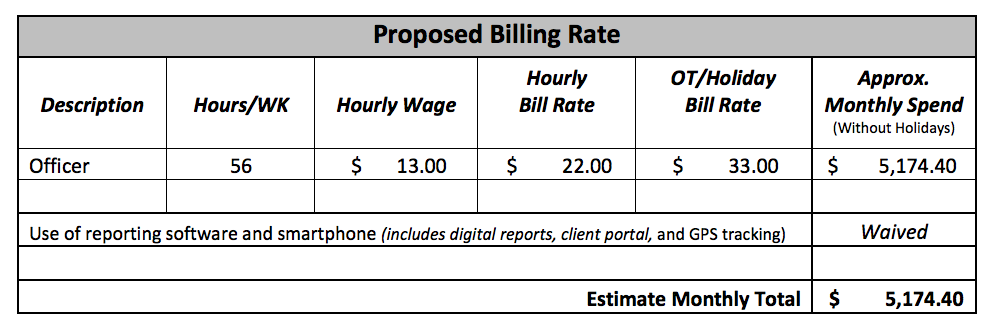
It’s common to add an additional $0.35-0.50 per hour to the rate on the backend, when you’re calculating all the overhead and costs that go into your hourly rate. Then, when you present it to the client, show the software as included at no additional charge.
Bonus Content: We also put together a list of everything your hourly guard rate should include.
Pros of including it in the hourly rate
- You recoup the cost of the software and equipment, so it’s not impacting your bottom line.
- You remove the ability for the client to decline the use or cost of the software.
- You’ll be as efficient as possible if you win the contract.
- The client sees the software as included at no extra charge.
Cons of including it in the hourly rate
- Your hourly rate will be higher than it would be if you cut the cost of the software or gave them the option to decline.
The Three Options Side by Side
| Option | How it appears in the proposal | Can the client decline? | Best for |
|---|---|---|---|
| 1. Flat monthly fee | A separate monthly line item | Yes | Clients who want simple, predictable pricing for an optional extra |
| 2. Hourly add-on | A per-hour charge on top of the guard rate | Yes | Rarely recommended, because a variable charge invites the client to decline |
| 3. Included in the hourly rate | Shown as included at no additional charge | No | Most security companies, and the approach we recommend |
How to Calculate Your Software Cost per Guard Hour
To build the cost into your rate accurately, work it out per site:
- Add up your monthly costs for the site. Software, devices and data plans for the officers who work there.
- Estimate the monthly guard hours. A post staffed 24 hours a day, 7 days a week covers about 730 hours a month.
- Divide cost by hours. For example, $250 a month across 730 hours is about $0.34 per hour.
- Add it to your overhead. Include it with the other costs in your rate, then apply your margin.
The example figures are for illustration only, so use your own numbers. Your costs drop further if officers use their own phones, and because TrackTik pricing is based on your sites and modules rather than per-seat fees, the cost per hour stays predictable as you add officers.
What to Say When a Client Asks About the Cost
Clients rarely object to software they can see working for them. Focus on what they get, not what it costs you:
- Real-time reports and alerts, instead of waiting for paperwork
- GPS-verified patrols that prove the work was done
- Faster response, because supervisors can see issues as they happen
- Client portal access to review activity at any time
That value is also what lets you win contracts without being the lowest bid.
Summary
We covered 3 ways to pass on the cost of guard management software to your client:
- You can include it as a flat monthly fee
- You can include it as an add-on to the hourly rate
- You can include it in the hourly rate
In working with thousands of companies over the past 10 years, we’ve seen method three deliver the most successful outcomes. But every security company is different, so we encourage you to test these different methods to see which works best for you.
Want to see what your clients would get from TrackTik? Book a TrackTik demo.
Frequently Asked Questions
Latest Articles





Featured Resources





See Trackforce in action
Book a walkthrough with our team and see how it fits your operation.