Security Post Orders: How to Write Them (Free Template Included)

Trackforce
November 19, 2026 · 14 min read

Security post orders are site-specific written instructions that tell officers what to do, when to do it, and how to do it at a given post. Strong post orders cover site details, duties by shift, patrol routes, access control, emergency procedures, escalation contacts, reporting requirements, and prohibited actions.
Whether a new site starts Monday or a client has asked for updated orders, you need instructions that any officer can follow on day one. This guide explains what to include, walks through how to write post orders step by step, and gives you a free template to tailor for each site. Jump to the free template to grab it.
Key takeaways
- Post orders are site-specific.
They turn a contract into clear, daily instructions for the officer on post. - Cover the essentials.
Site information, duties by shift, patrol routes, access control, emergency procedures, escalation contacts, reporting rules, authority limits, and prohibited actions all belong in the document. - Write for the relief officer.
One action per line, plain language, and specific times and triggers instead of words like “regularly” or “as needed.” - Get sign-off and keep it current.
Review the draft with the client, train officers, collect acknowledgment, and set a review schedule. - Digital delivery closes the gap.
With TrackTik by Trackforce, teams update post orders in one place, deliver them to officers on mobile, and track acknowledgment.
What Are Security Post Orders?
Security post orders are site-specific written instructions that tell officers what to do, when to do it, and how to do it at a given post. They turn the scope of a security contract into daily actions an officer can follow without guessing.
General Orders vs. Post Orders
General orders apply to every officer in a security company. They cover conduct, attendance, uniform standards, and company policy. Post orders apply to one site or post. They cover where to stand, which doors to check, who to call, and what to do when something goes wrong. In short, general orders describe how the company operates, and post orders describe how this site operates.
Who Writes and Approves Post Orders?
Operations managers or account managers at the security firm usually write post orders, often with input from the client. The client’s site contact and the firm’s management typically approve them, and legal or HR may review sections that touch on authority limits or employment rules. Sites with specialized requirements, such as healthcare facilities, often involve additional stakeholders.
Why Do Clear Post Orders Matter?
Clear post orders help security teams deliver consistent service across every shift and site. Well-written orders support four outcomes:
- Consistent coverage across shifts. Day, night, and weekend officers work from the same instructions.
- Faster onboarding for new and relief officers. Someone covering a post for the first time can see what is expected without waiting for a handoff.
- Clearer expectations with clients. Written duties give both sides a shared reference when scope questions come up.
- Better documentation for audits and incident reviews. When orders are current and acknowledged, you can show what officers were told and when.
Documentation and compliance are where post orders often come under scrutiny. For a deeper look at what licensing boards, insurance carriers, and clients check, read the Audit-Ready guide to licensing, screening, and workforce compliance. If you want to see how a platform supports that record, explore how TrackTik helps teams stay compliant.
What Should Security Post Orders Include?
Effective security post orders include eleven core elements. Use this list as a checklist when you build or audit orders for any site.
- Site information. Address, client contacts, operating hours, and a site layout or map.
- Post details. Post location, shift times, and required uniform and equipment.
- Duties and responsibilities by shift. What officers do at the start, middle, and end of each shift.
- Patrol routes, frequency, and checkpoints. Where officers walk, how often, and what they verify. A security guard tour system can confirm each checkpoint with NFC, QR code, barcode, or GPS.
- Access control rules. How to handle visitors, employees, vendors, and deliveries.
- Emergency procedures. Steps for fire, medical events, intruders, severe weather, and evacuation.
- Escalation and contact list. Names, roles, and phone numbers for supervisors, client contacts, and emergency services.
- Reporting requirements. What to report, when to report it, and in what format. See how security incident reporting keeps documentation consistent.
- Use of force and authority limits. Boundaries as defined by the contract and local law.
- Prohibited actions and site-specific rules. Anything officers must not do at this post.
- Revision date, version number, and officer acknowledgment. Proof that the orders are current and that officers have read them.
How Do You Write Security Post Orders? (Step by Step)
To write security post orders, walk the site, confirm scope with the client, define duties, write clear instructions, add emergency and reporting procedures, review, train, and schedule updates. Follow these nine steps in order.
- Walk the site with the client. Visit every post, entrance, and risk area in person. Note anything that affects how officers move, observe, or respond, such as blind corners, restricted zones, and delivery docks.
- Confirm scope and contract requirements. Agree with the client on what officers will and will not do. Check the contract for required services, response times, and reporting obligations so the orders match what was sold.
- Define duties for each post and shift. Decide what happens at opening, during the shift, and at close before you write any instructions. Different shifts often carry different tasks, so list them separately.
- Write each instruction as one clear action. Use plain language and action verbs. Each line should tell the officer one thing to do, such as “Lock the east entrance at 6:00 PM.”
- Add emergency procedures and escalation paths. Include real names and current phone numbers, not job titles alone. Spell out what to do first for fire, medical, intruder, severe weather, and evacuation events.
- Spell out reporting expectations. Tell officers what to report, how quickly, and in what format. Include an example of a complete report so officers know what good documentation looks like.
- Review the draft with the client and, where needed, legal or HR. Ask the client to confirm accuracy. Have legal or HR check sections on authority limits, use of force, and employment rules.
- Train officers and collect acknowledgment. Walk officers through the orders before their first shift on post. Capture a signed or digital acknowledgment so you have a record of who read which version.
- Set a review schedule. Review post orders on a fixed cycle and update them whenever the site, the client, or the contract changes. Record the revision date and version number each time.
How Do You Write Post Orders Officers Will Actually Follow?
Officers follow post orders that are short, specific, and easy to find. Five habits make the biggest difference:
- Use “if this happens, do this” phrasing for situational instructions.
- Keep one instruction per line and avoid long paragraphs.
- Replace vague words like “regularly” or “as needed” with specific times and triggers.
- Write for a relief officer who has never seen the site.
- Make the orders easy to open on shift. Instructions that live in a binder get skipped.
Example: Vague vs. Clear
| Vague instruction | Clear instruction |
|---|---|
| Check the loading dock regularly. | Walk the loading dock at the top of every hour. Confirm the roll-up door is closed and locked, then log the check. |
| Handle suspicious visitors appropriately. | If a visitor refuses to sign in, do not allow entry. Call the site contact on the escalation list, then notify your supervisor. |
| Report incidents as needed. | Submit an incident report before the end of your shift. Include time, location, people involved, actions taken, and photos if safe to capture. |
What Are the Most Common Post Order Mistakes?
The most common post order mistakes are copying generic orders across sites, letting them go stale, and having no record of who read them. Watch for these five:
- Copying generic orders across sites without tailoring them to each location.
- Letting orders go stale after a client change, a new entrance, or a revised contract.
- Storing orders in a binder that officers rarely open.
- Keeping no record of who read the latest version.
- Mixing company policy and site instructions in one long document.
Most of these come down to the same problem: the orders exist, but nobody can prove officers received the current version. TrackTik Guard Management addresses this by putting instructions on the officer’s mobile app.
What Do Security Post Orders Look Like by Site Type?
Post orders change with the risks, traffic, and rules of each site. These short samples show how the same structure adapts. Tailor every line to your own site before use.
Retail Post Order Example
- Greet customers at the main entrance during store hours.
- Walk the sales floor every 30 minutes. Note blocked exits and unattended high-value displays.
- If you observe suspected theft, do not confront. Notify the store manager and record a description.
- Escort the cash handler to the bank drop at 8:00 PM.
- Submit a shift report before leaving the post.
See how Trackforce supports retail security operations.
Healthcare Post Order Example
- Patrol the emergency department entrance and waiting area every 20 minutes.
- Follow the facility’s de-escalation protocol. Call for backup before physical contact is considered.
- Check parking structure levels 1 through 3 at the top of each hour after dark.
- Escort staff to vehicles on request. Log each escort with time and location.
- Report every incident to the security supervisor before the end of shift.
Explore how Trackforce supports healthcare security teams and why proving coverage in high-risk areas matters for audits.
Corporate Office Post Order Example
- Verify every visitor against the expected guest list and issue a visitor badge.
- Check badge credentials at the lobby turnstiles from 7:00 AM to 9:30 AM.
- Walk each floor at 10:00 PM and 2:00 AM. Confirm secure doors are locked.
- Notify the facilities manager of any unlocked door or unattended package.
- Log all after-hours entries with name, time, and reason.
See how Trackforce supports enterprise security teams.
Free Security Post Orders Template
Use this checklist as a starting point for any site. Work through each section, fill in the site-specific details, and remove anything that does not apply. Always tailor the orders to each site and have the client review the final version.
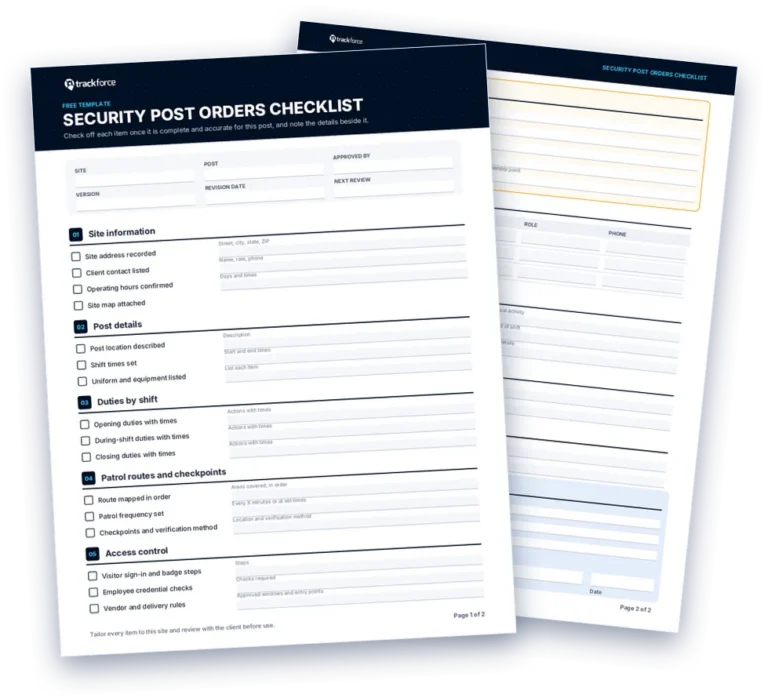
Free template · 2-page PDF
The security post orders checklist
Walk the site, check off each item, and capture the details your officers need on day one.
How to Use the Template
Start with a site walk, fill in each section with the client, and review the draft before it goes live. Revisit the document on your set schedule and whenever the site, contract, or contacts change.
How Do Digital Post Orders Keep Instructions Current?
Digital post orders keep instructions current by storing them in one place, delivering them to officers on mobile, and recording who has read them. Paper and PDF post orders are hard to keep accurate. Copies multiply, versions drift, and nobody can confirm which officer saw the latest update.
TrackTik by Trackforce gives security teams a single platform to manage post orders alongside patrols, incidents, and scheduling. Here is how it helps:
- Update instructions in one place. Create post orders at the site, zone, or department level and edit them centrally when something changes.
- Attach what officers need. Add text, images, and files such as site maps or emergency procedures to each post order.
- Reach officers on their phones. Officers open post orders in the TrackTik mobile app on site, with no binder to carry, and can keep working when connectivity is limited. See TrackTik Guard Management.
- Track acknowledgment. Require officers to acknowledge post orders when they read them, which gives supervisors a record of who has seen the current version.
- Connect instructions to action. Pair post orders with the Security Guard Tour App, Site Tasks, and Security Incident Reporting so officers have guidance, tasks, and documentation in one app.
- Support dispatch. When an incident occurs, officers receive the alert, a map, and the relevant post orders on their device through Security Guard Dispatch.
- Show clients the proof. A client portal lets clients see site activity and documentation for themselves.
Post orders are only half of accountability. Proving that officers received updated instructions matters as much as proving what they did in the field. Read more in The Other Half of Accountability: Getting Information to Your Guards and The Human in the Middle: How AI and Workflow Automation Are Redefining Security Guard Protocol Management.
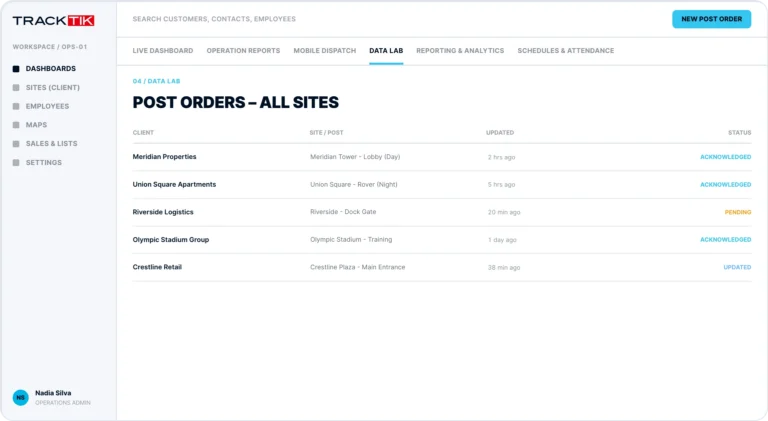
See it in action
See how TrackTik manages post orders across sites
Clear post orders start with a good template and stay useful when officers can open the current version on their phones. See how TrackTik helps your team manage post orders, patrols, incidents, and acknowledgments across every site.
Security Post Orders FAQ
Latest Articles




Featured Resources





See Trackforce in action
Book a walkthrough with our team and see how it fits your operation.