If you’re not tracking it, it won’t improve

Meeting SLAs can be challenging. With TrackTik’s Mobile Patrol module you get the fastest routes and complete visibility on the progress of your guards’ patrols, turning a moving target into a predictable, reportable service.

  • Fastest, optimized patrol tour routes
  • Complete visibility on patrol progress
  • Detailed, customer-ready reporting

Trusted by 4,600+ security organizations worldwide
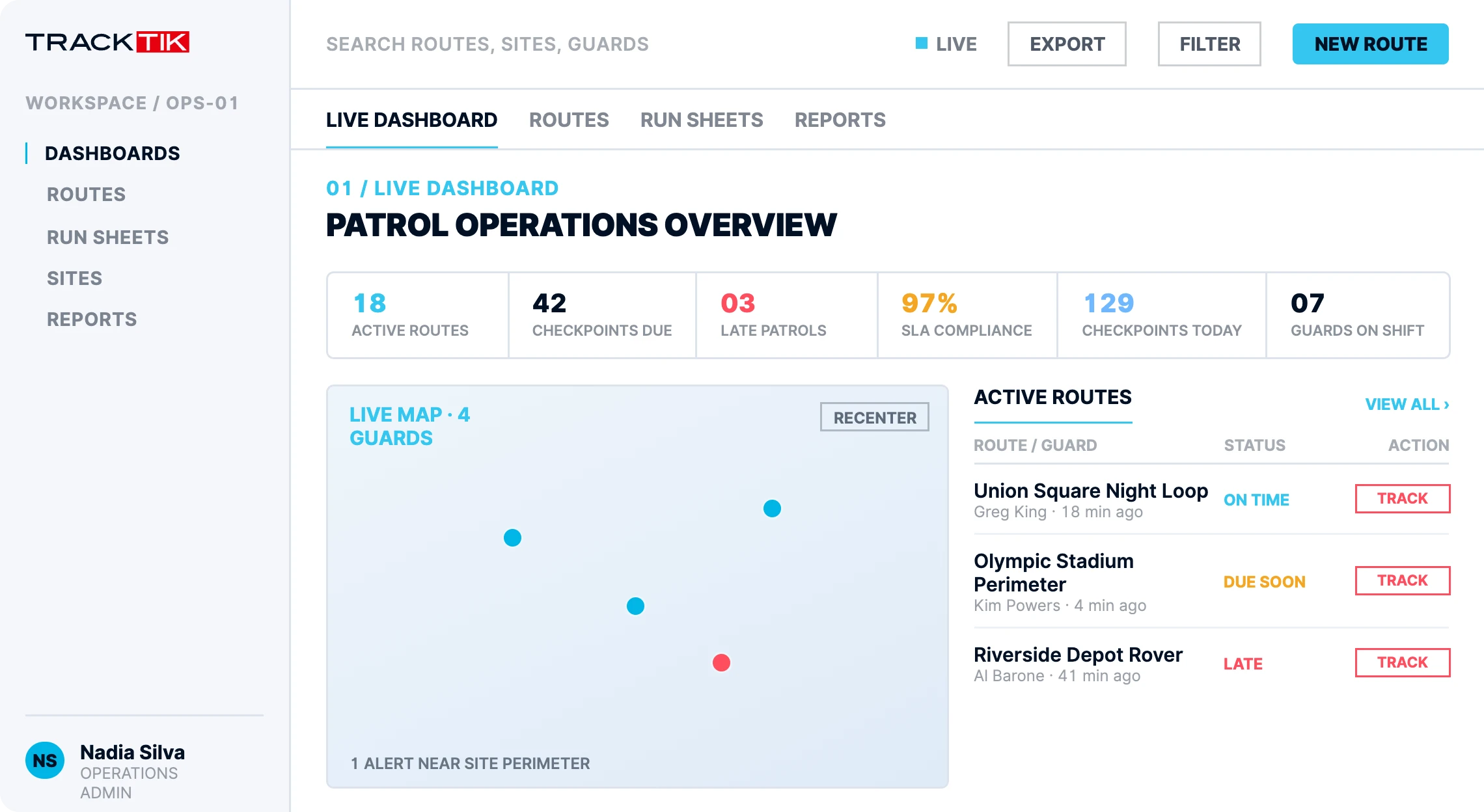
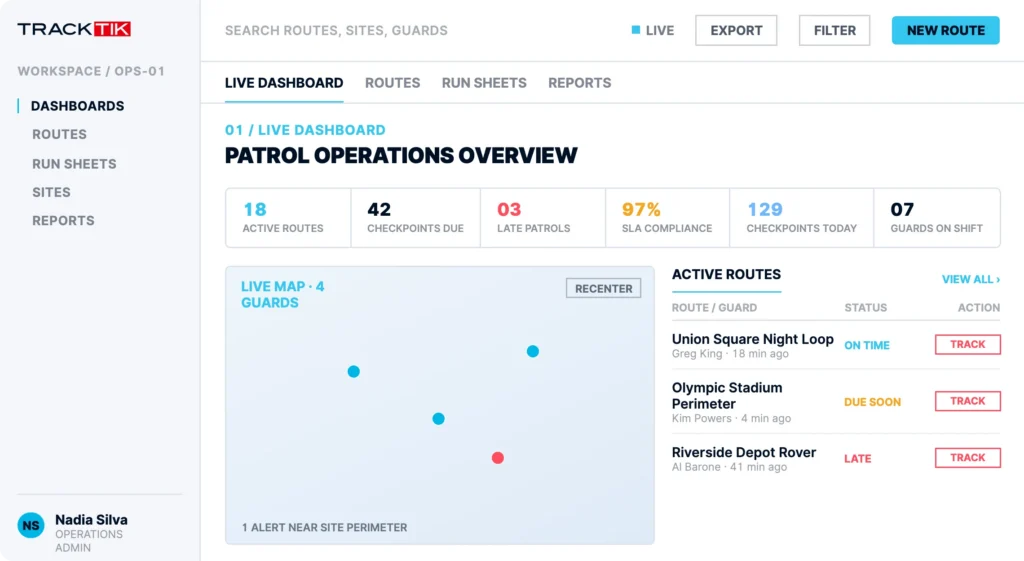
TrackTik mobile patrol live operations dashboard tracking patrol progress across sites

Trusted by the security leaders who set the standard

Reliable by design

Efficient routes, live oversight, and proof for every client.

Design patrol routes for maximum efficiency, with just enough unpredictability to stay reliable, then watch every run sheet progress in real time and turn the data into detailed reports your customers can trust.

Route optimization

Optimize patrol tour routes.

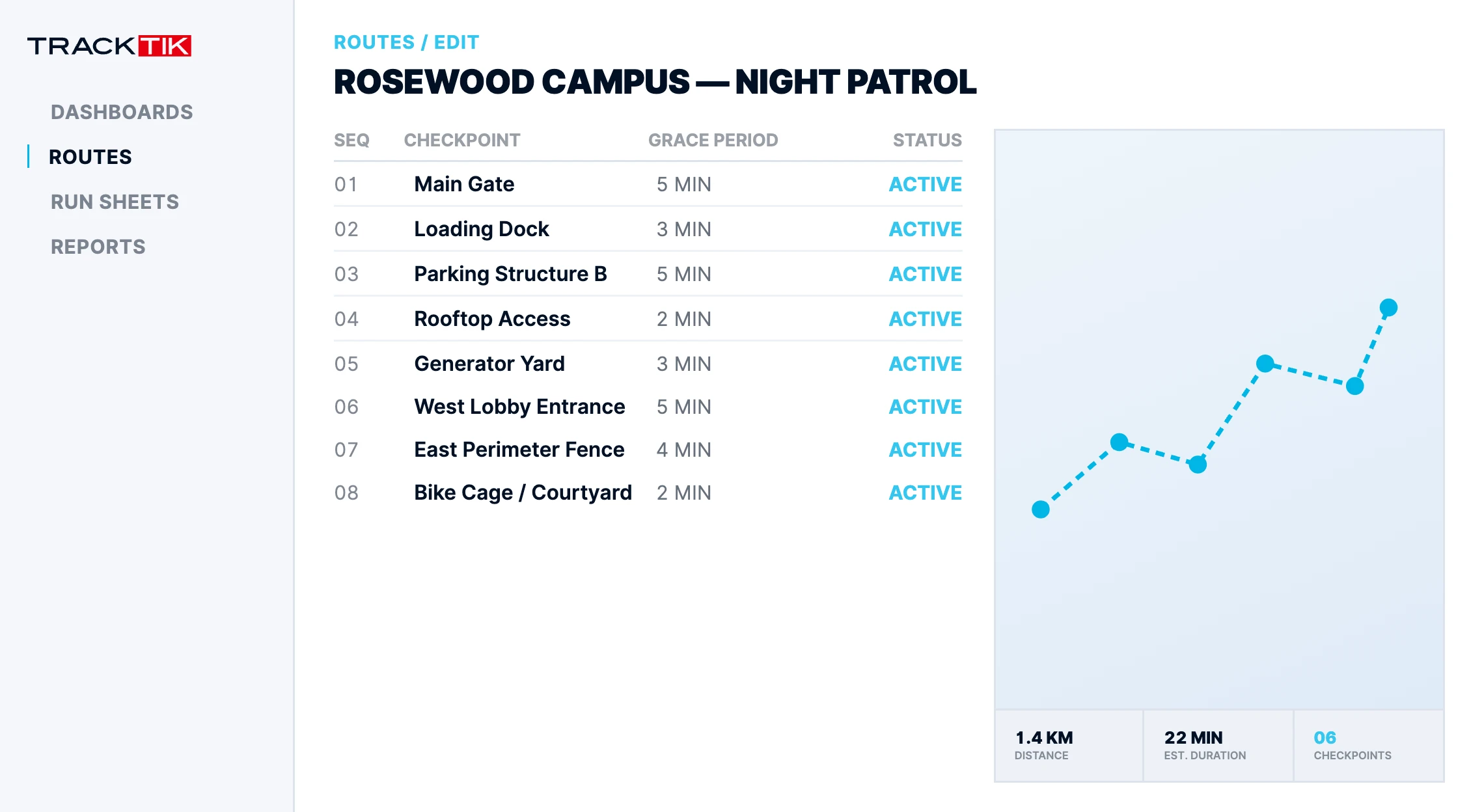
With complete control over your mobile security patrol routes, you can optimize them to increase efficiency, but also design in unpredictability to make sure you are providing a reliable service. Using the configurable patrol schedule, you can make guard tours a mandatory part of mobile patrols and customize grace periods to account for variables in each shift period.
  • Configurable patrol schedules
  • Built-in unpredictability for reliability
  • Custom grace periods per shift
TrackTik route optimization builder mapping an optimized mobile patrol route
Active patrol view

Manage your run sheets.

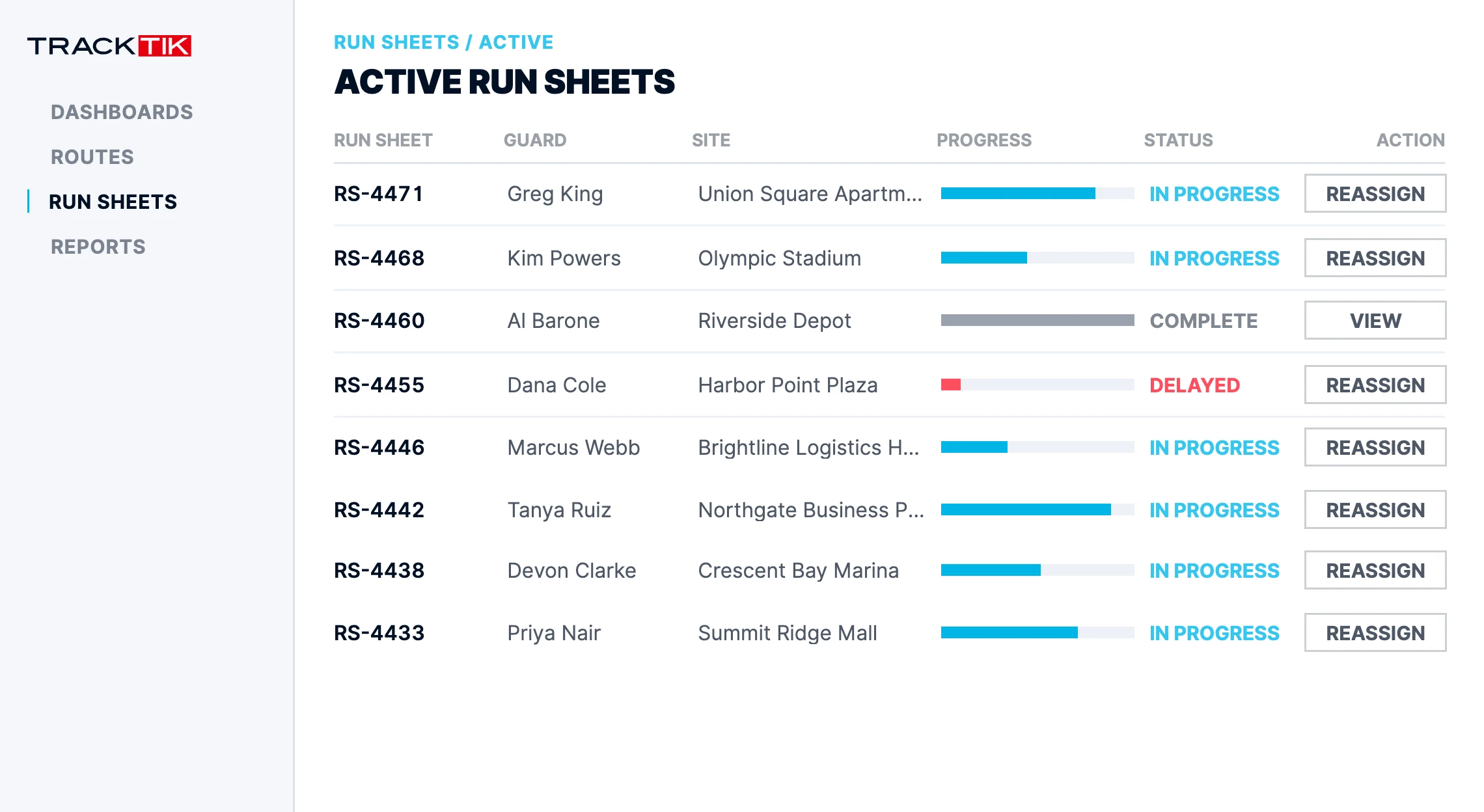
Using the active patrol view in TrackTik, you have a live feed of your mobile operations and can assign resources to jobs based on what is happening in the field. Reassign jobs to dispatch officers or amend a run sheet to accommodate changes while complying with your contractual obligations to both officers and customers. Tracking each run sheet progression gives deep insight into performance and opportunities for efficiency.
  • Live feed of field operations
  • Reassign jobs and amend run sheets on the fly
  • Track progression for performance insight
TrackTik active patrol view showing live guard run sheets and job assignments
Customer reporting

Share reports with customers

With the data collected on your mobile patrols, you can take transparency to the next level by easily creating detailed, custom-tailored reports for each customer, delivering assurance on service quality with every patrol you run.
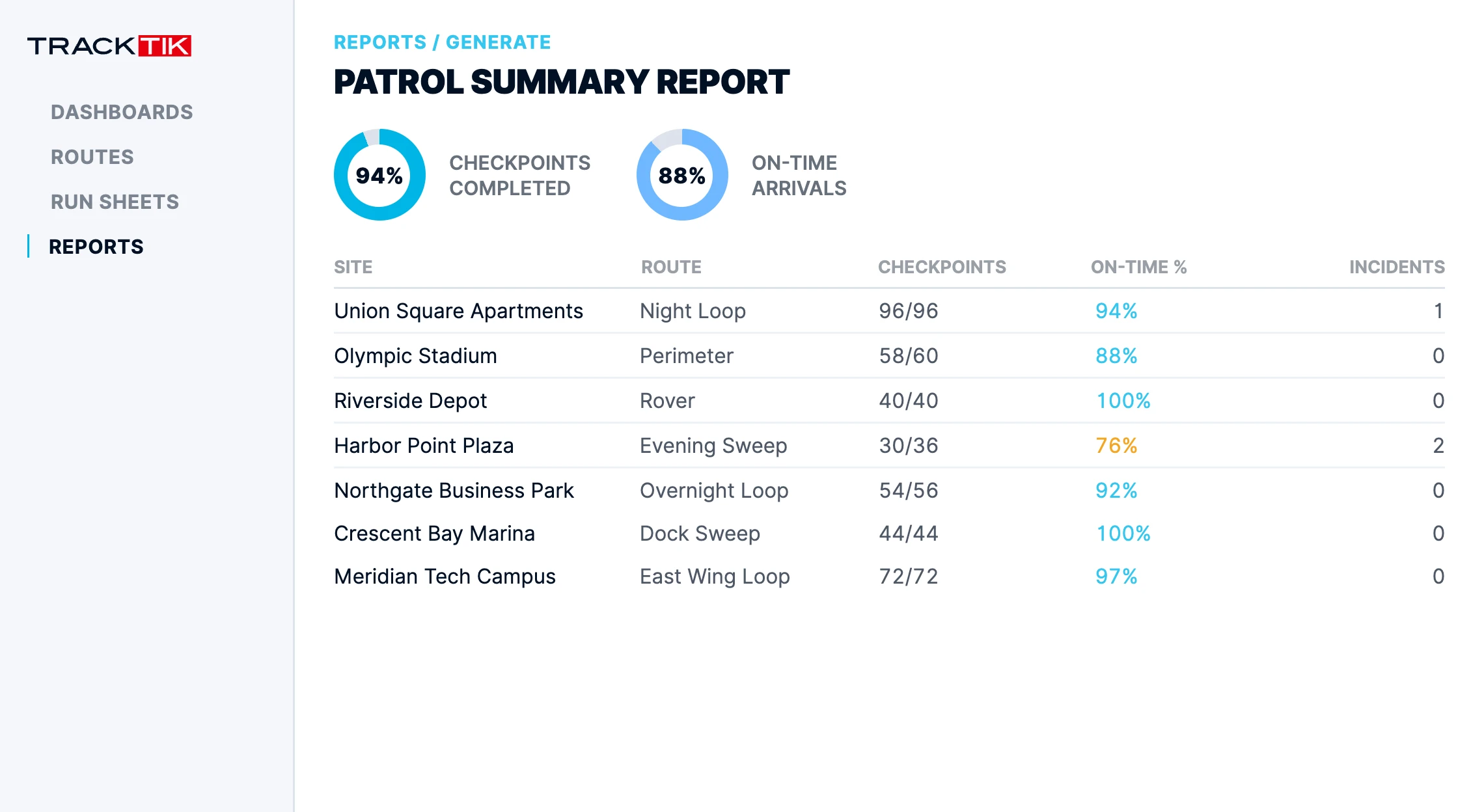
  • Custom-tailored reports per customer
  • Assurance on service quality
  • Break down patrols by any dimension
TrackTik mobile patrol summary report prepared for a customer
How a patrol runs

From scheduled route to reported result, every step tracked.

1

Schedule the route

Build a configurable patrol schedule with mandatory guard tours and grace periods.

2

Guide the guard

Officers get the fastest optimized route with turn-by-turn directions in the field.

3

Manage live

The active patrol view lets you reassign jobs and amend run sheets in real time.

4

Report & prove

Patrol data becomes detailed, customer-ready reports across every dimension.

Built for patrol operations

Configurable to the way you patrol.

Optimized routing

Design the fastest routes and build in unpredictability for reliability.

Configurable schedules

Make guard tours a mandatory part of every mobile patrol.

Custom grace periods

Account for the variables in each shift period without breaking SLA.

Mandatory tours

Ensure checkpoints are hit and nothing on the route gets skipped.

Run sheet progression

Track each patrol progress for deep performance insight.

SLA compliance

Meet contractual obligations to officers and customers alike.

Real results for security teams
Faster routing

Get guards on the most efficient routes.

Live visibility

See patrol progress in real time.

Provable SLA compliance

Turn activity into client-ready reports.

Advanced reporting

Advanced reporting for when you need it.

Create the exact reports your team and your customers need, with flexible filters and easy export options.
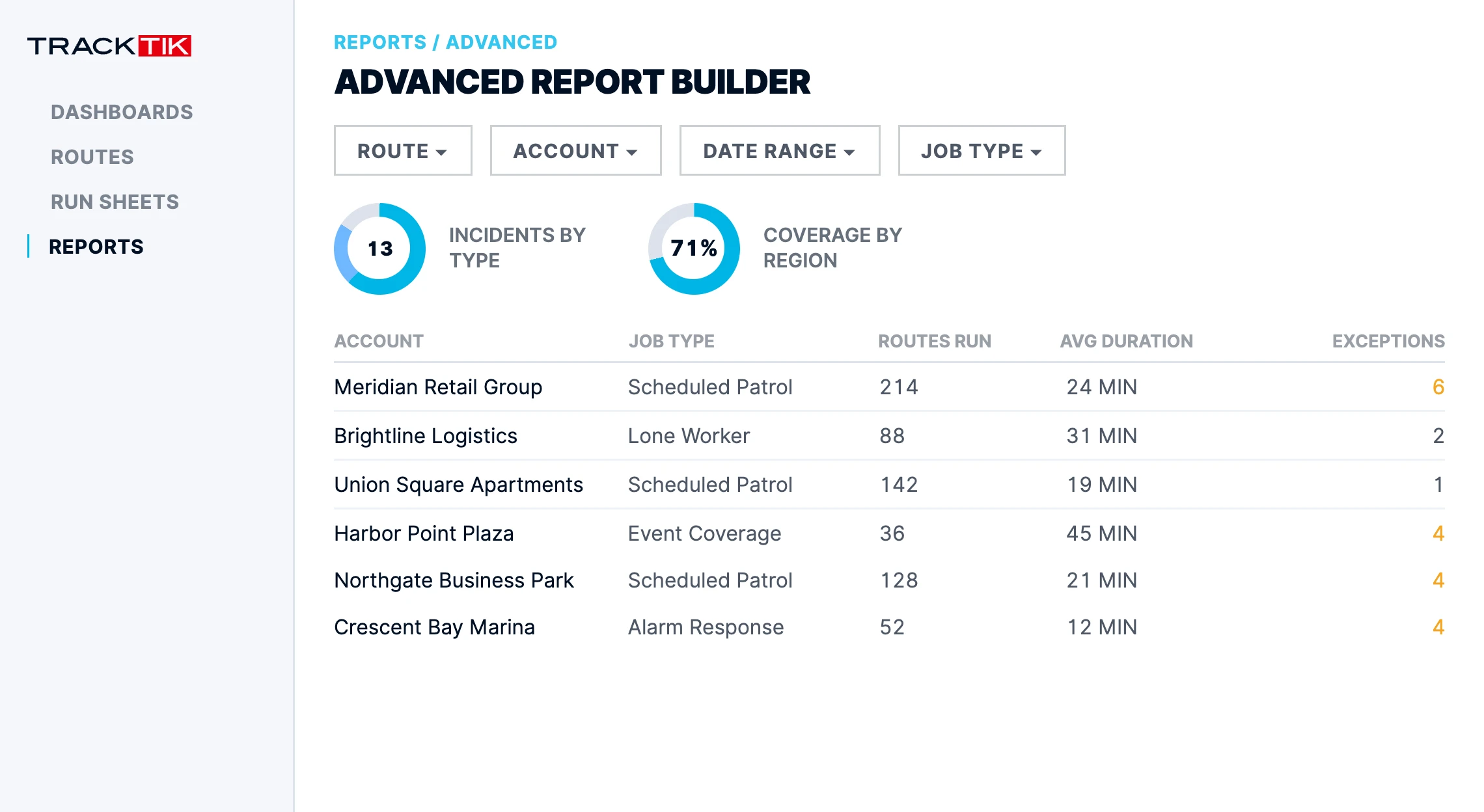
  • Multiple report types
  • Flexible date ranges and filters
  • Export and share in seconds

See reporting options

TrackTik advanced report builder configuring a custom mobile patrol report
Better together

Mobile Patrol connects to the rest of your operation.

“TrackTik has helped us win new Mobile Patrol clients by clearly showing when officers arrive on site, what they discover during patrols, photos from the site, and when they leave. The level of visibility and detail has been a major selling point.”

Chris Boyetchko, Operations Manager, Paladin Security

Frequently asked questions

Your questions, answered.

Mobile patrol management software plans, tracks, and documents patrols that cover many sites with officers on the move, rather than holding post at a single one. It is the branch of security patrol software built for routes, and TrackTik Mobile Patrol is purpose-built for it: the system builds the route, follows the patrol live as officers work through it, and turns the completed run into a report your client can read. It is one module of the wider TrackTik platform, so mobile patrol data flows straight into scheduling, billing, and reporting with no re-entry.

You get complete control over every route, so you can sequence stops for the fastest run while designing in enough unpredictability to keep the service genuinely reliable. Configurable patrol schedules let you make guard tours a mandatory part of every mobile patrol, and custom grace periods absorb the normal variables of a shift period without putting an SLA at risk.

A run sheet is the ordered set of jobs an officer works through during a mobile patrol shift. The active patrol view gives you a live feed of your field operations, so you can reassign a job to a dispatch officer or amend a run sheet when conditions change, while still meeting your contractual obligations to both officers and customers. Tracking each run sheet progression is where a lot of the performance insight comes from.

Officers work from the TrackTik security guard app on iOS and Android, which walks them through each stop and verifies activity at the moment it happens, confirming checkpoints with GPS and NFC as officers move through the route. The app is offline capable, so a coverage gap does not become a gap in the record. Missed checkpoints flag to supervisors in real time, and everything captured feeds the patrol report that proves the work was done.

Meeting SLAs gets far easier when patrol progress is visible while there is still time to act on it. TrackTik shows every run sheet advancing in real time, so a late or skipped stop surfaces during the shift instead of in next month’s review. Custom grace periods keep normal shift variance from counting against you. Teams running around the clock often pair this with the command center for one live view across every site.

Yes. The data collected on your mobile patrols becomes detailed, custom tailored reports for each customer, broken down across any dimension of your operation. That transparency is frequently what wins and keeps contracts. For trends across the whole book of business, business intelligence turns the same patrol data into dashboards and board ready reporting.

Static guarding covers one site with officers on post. Mobile patrol covers many sites with officers on the move, which makes routing, timing, and proof of attendance the hard parts. TrackTik Mobile Patrol is built for that second model and sits inside the broader mobile security operations suite. If you run both models, they operate on one platform and one set of data.

There is no single standard. Patrol frequency comes down to the contract, the risk profile of each site, and what the client is funding, which is why TrackTik makes it configurable rather than fixed. You set the patrol schedule per site, make specific guard tours mandatory inside each run, and apply custom grace periods so normal shift variance does not breach an SLA. Building in some unpredictability matters too, since a patrol that arrives at the same minute every night is easy to work around. Run sheet data then shows you whether the frequency you promised is the frequency you are actually delivering across your security operations.

Typical time to launch across the platform is 6 to 8 weeks, and timelines scale with how many modules you turn on and how complex your data migration is. You get a dedicated onboarding lead, with data migration and system integration handled by the Trackforce team, plus role specific training for dispatchers and supervisors. For Mobile Patrol itself, most of the setup is configuration work: building your routes, setting grace periods, and deciding which tours are mandatory. See professional services for what is included, request pricing for a quote against your site count, or get a demo to see a route like yours.

That is the core of what TrackTik does. The patrol hours captured in the field flow straight through to billing and payroll preparation with no re-entry, so the same data that proves a route was completed is the data that generates the invoice. Actual versus scheduled hours are validated automatically and discrepancies get flagged before invoicing goes out, which is where margin quietly leaks in mobile patrol work. Route schedules, mandatory tours, grace periods, and exception alerts all run on rules you configure once rather than checks someone performs by hand. See contracts and invoicing for how patrol data becomes a client invoice.

Related resources

More on proving the work to clients
Ready to unify your security operations and respond with confidence?

See how TrackTik’s Mobile Patrol gets guards on the fastest route, keeps every patrol in view, and turns the data into proof of service.