Customer Spotlight: GMI’s Transition From GuardTrax to Silvertrac

Trackforce
October 8, 2015 · 11 min read
At the ASIS Security Expo, we sat down with Melanie Bamba, a business development manager with Guard Management, Inc. (GMI) in San Diego, for an unscripted conversation about her company’s move from GuardTrax to Silvertrac. Because it was recorded on the spot, it gives a candid view of how guard management software changed the way GMI sells to, and keeps, property management clients.
Originally published in 2015. Silvertrac is now part of Trackforce, the company behind TrackTik, and the client visibility GMI describes is core to the TrackTik platform today. Learn how Silvertrac joined Trackforce.
Most of our earlier customer spotlights featured firms moving off paper or spreadsheets. GMI’s story is different: they were already tracking officers with GPS, and still found more value once tracking and reporting lived in one system.
Key takeaways
- Tracking alone did not answer the client’s real question.
GPS showed where officers were, but property managers also wanted to know what was reported, by whom and when. - Property managers want one view of every property.
Many of GMI’s clients oversee five or six sites and value seeing them all in one place. - Self-serve access beats emailed reports.
A searchable client portal replaced separate logins and report requests. - Live demos sell better than slides.
Filing a real report from a phone in the meeting shows clients how fast the data arrives. - Year-end reports protect renewals.
When budget season puts the security contract under review, a summary of a year’s work makes the value visible. TrackTik carries this forward with a client portal, scheduled reports and business intelligence dashboards.
Before and After Silvertrac
Melanie started with GMI as a client service manager and then moved into sales. She had been there for two years at the time of our conversation, so she saw the business both before and after the transition. From a business development standpoint, she found the software’s versatility and capabilities useful in communicating GMI’s value to property managers.
“A lot of our property managers, it’s not just one property or two, they have five or six they’re looking at, and they want to see that overview. That’s really nice on the property manager side, to be able to visually see what all their properties look like in one place.”
Melanie Bamba, Business Development Manager, Guard Management, Inc.
She found that property managers especially liked the centralized client Issue Monitor, which let them search for and review reported issues across their properties. Today, Silvertrac offers professional summary reports and a client portal built for exactly that kind of multi-site visibility.
From GuardTrax to Silvertrac: Tracking Plus Reporting
GMI had been using GuardTrax, which, as Melanie described it, focused mostly on tracking officer movement to increase accountability. What she liked about Silvertrac was that it gave property managers an overhead view of guard locations and tied that view to reporting, so they could see which guard was reporting, where from and when.
“With our (old) portal, they would either have an e-mail, then they’d have to log in to GuardTrax, so they’d have to request a report from us, then they’d have to look at it separately, and those still wouldn’t be timed to the specific reports. Here you’re able to pull up the photos, see which officer did it, it’s very effective and very useful.”
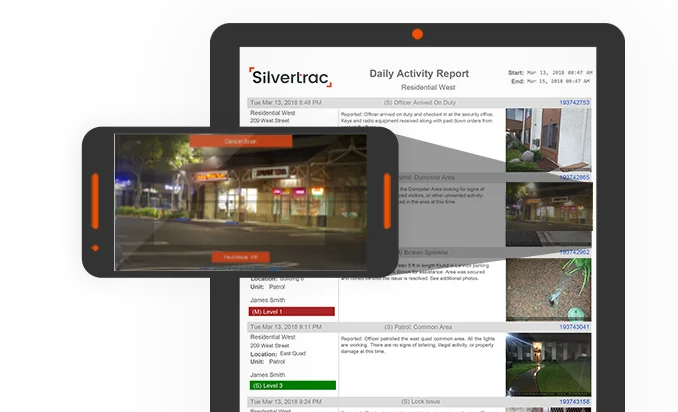
That combination is now standard in modern platforms: verified guard tours show where officers went, and incident reports with photos and timestamps show what they found.
GMI’s Client Experience at a Glance
Here is how the client experience changed, based on what Melanie shared with us.
| Area | With a GPS tracking tool | With Silvertrac |
|---|---|---|
| Multi-property view | Properties reviewed one at a time | All properties visible in one place |
| Getting reports | An email, a separate login or a report request to GMI | Clients search and review issues themselves in the Issue Monitor |
| Location and reports | Tracking data not tied to specific reports | See which officer reported, where from and when |
| Evidence | Separate files to review | Photos attached to the report |
Pitching Silvertrac to Property Managers
“We walk in there and we’ve already got our own examples,” Melanie told us about how she sells the value of Silvertrac to property managers. “We might have a demo that we use, but we’ll show them live, ‘this is what the officer’s doing.’”
GMI shows managers how issues with officers can be seen in real time. Using the Silvertrac app on her phone, Melanie can file a report right there in the conference room to show managers how instantaneous it is. Drawing on real experience with the software to sell it is exactly what we recommended in 3 Characteristics of Successful Guard Management Software Customers.
It also speaks to what property managers care about most. Their goals usually include occupancy, renewals and staying on budget, and a security partner that makes them look good on those measures is hard to replace. Read more on what motivates a property manager to change security providers.
Using Year-End Reports to Protect Renewals
In terms of retention, Melanie uses customizable reports to quickly and effectively address customer concerns. For instance, around the end of the year, when everyone starts wanting to know what the primary issues have been, she can quickly pull up the Issue Summary Report and show them exactly what the officers have been doing all year.
That’s an extremely powerful retention tool. When budget season comes around and managers look at the security contract as a place to make cuts, it’s valuable to have a report that shows what your officers have been doing and how they’ve added value.
Asked how Silvertrac has affected GMI’s retention, Melanie responded, “It is absolutely great, I haven’t had anyone shy away from it. I’ve been pushing more people to it and converting our existing clients over to it as opposed to GuardTrax.”
The lesson holds today: clients trust what they can see for themselves. Regular, visible proof of service turns the renewal conversation into a review of evidence rather than a negotiation over price.
From Silvertrac to TrackTik: Where This Story Goes Today
Silvertrac and TrackTik are both part of Trackforce. Silvertrac remains a straightforward guard management option, while TrackTik is Trackforce’s complete security workforce management platform. Everything GMI valued is built into TrackTik, along with much more:
- Client portal. Clients get real-time access to reports and operational overviews through TrackTik security operations, the modern version of the Issue Monitor.
- Scheduled reporting. Reports can be configured hourly, daily, monthly or annually, with automatic email or text notifications to clients and stakeholders.
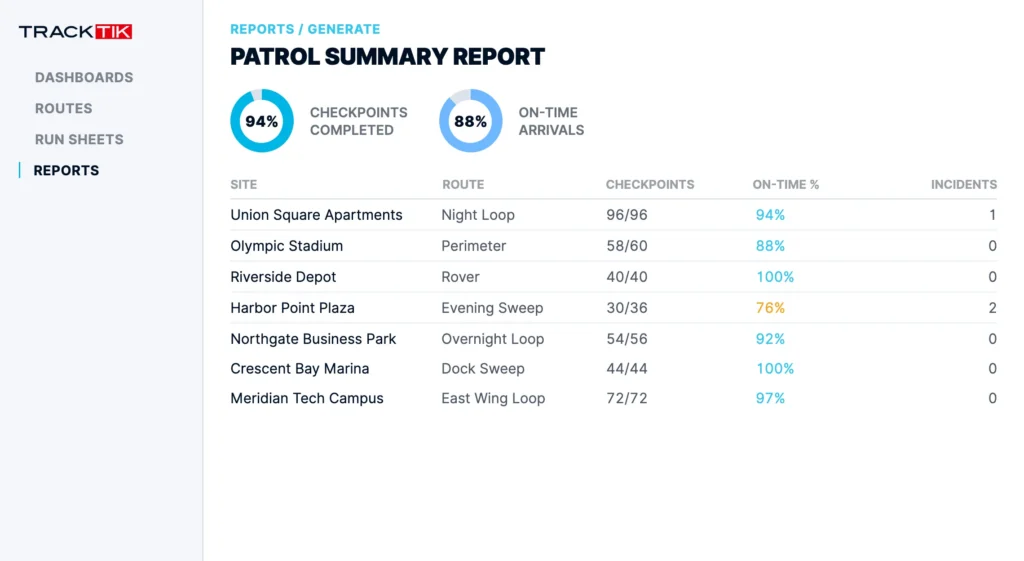
- Verified patrols. GPS, NFC and QR checkpoint scans and geofencing prove where officers were and when.
- Year-end proof on demand. TrackTik Business Intelligence turns field data into dashboards, KPIs, shareable reports and downloadable PDFs.
- Faster, cleaner reports. ReportPro AI turns rough field notes into polished incident reports and generates executive summaries for clients.
Signs It Is Time to Switch Guard Tracking Software
GMI’s move was driven by what clients needed to see. If any of these sound familiar, your current system may be holding you back:
- Clients have to email or call to get reports, or log in to more than one system.
- Location data and incident reports live in separate places and cannot be matched.
- Property managers with several sites cannot see them side by side.
- Building a year-end summary for a client takes days instead of minutes.
- Officers resist the app because it is slow or hard to use in the field.
Not every frustration means it is time to move. Our guide to when to replace your security management system (and when to wait) covers the deal-breakers that justify a change.
How to Switch Platforms Without Disrupting Your Clients
- Secure your data first. Confirm you can export incident history, tour records and client reports in a usable format. Read who really owns your security data before signing anything.
- Start with one client or site. A phased rollout lets you prove the new system before converting every account, just as GMI moved existing clients over gradually.
- Train officers on the mobile app. The TrackTik security guard tour app runs on iOS and Android, so officers can work from a familiar device.
- Give clients portal access early. Walk property managers through the portal so they see the improvement right away.
- Show results at the first review. Bring a summary of tours, incidents and response times to prove the switch was worth it.
What Can Silvertrac and TrackTik Do for You?
This conversation shows how the right software can add value even above a GPS and geofencing tool. For security firms that sell to property managers, the ability to show what officers did, where and when is often what wins and keeps the contract.
If anything Melanie said stood out to you, give us a call or schedule a TrackTik demo. We love talking with security operators about their business needs and how our software can make their lives easier.
Frequently Asked Questions
Latest Articles





Featured Resources





See Trackforce in action
Book a walkthrough with our team and see how it fits your operation.