Security Guard Log Made Easy: Here’s Our Practical Checklist

Trackforce
March 16, 2017 · 7 min read
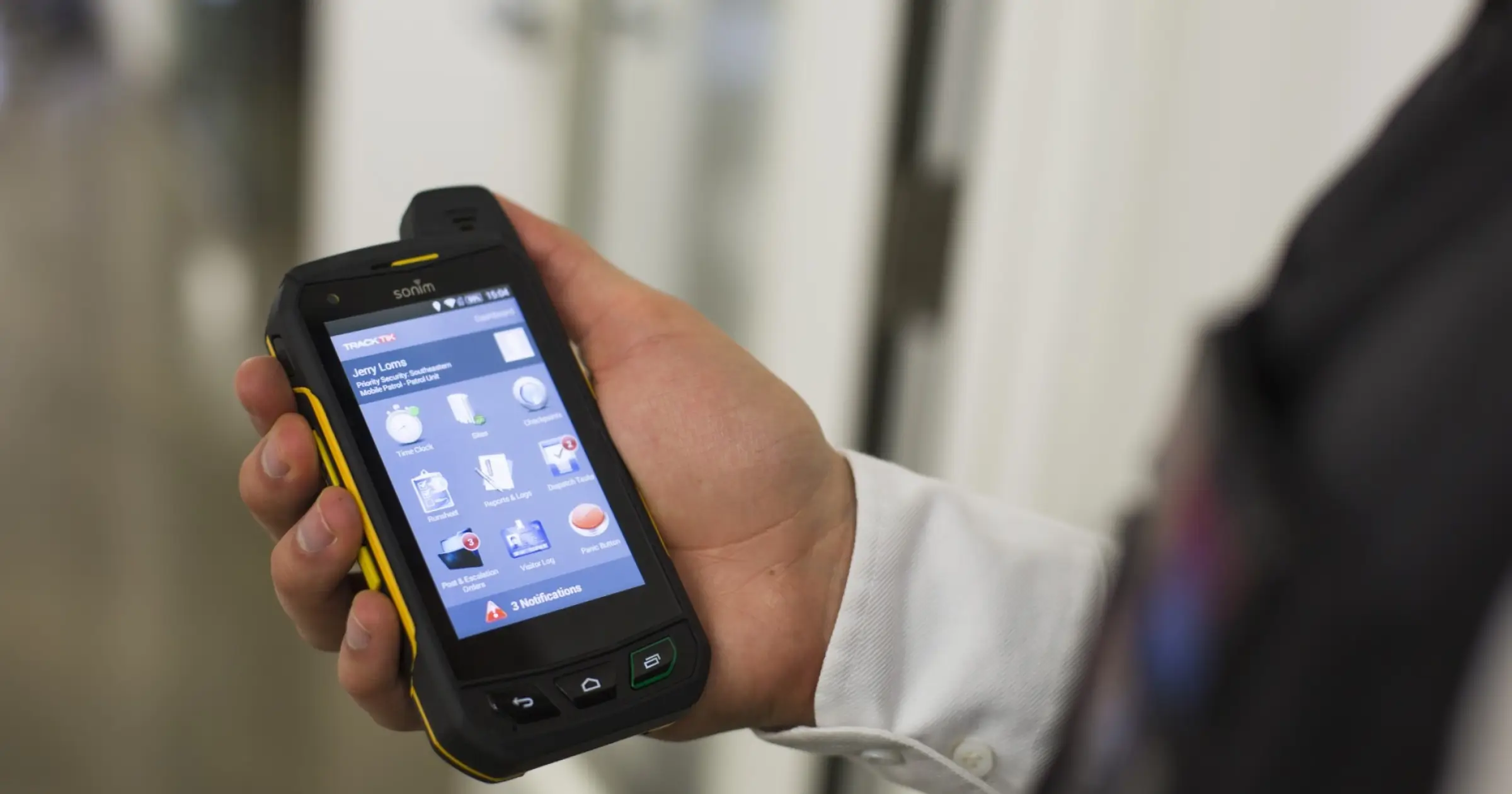
As important as it is to have your security team on site to perform their patrol, both your clients and your back office management depend on accurate reporting to know that shifts are being completed properly. And of course, a security guard log (or daily activity report) becomes even more important when a guard is required to respond to an on-site incident.
Of course, a poorly-written report that lacks vital pieces of information will not do much to give your clients peace of mind. So what do you need to include to make your daily reports worthwhile? The following elements are must-haves in order for your guards to produce an effective and useful security guard log at the end of their shift:
Key takeaways
- The security guard log is your proof of service.
Clients and back-office teams rely on it to confirm shifts were covered and patrols were completed. - Seven elements make a log useful.
Shift start notes, categorized information, activity records, timestamps and location, photos and video, custom data, and analytics. - Specific beats vague.
“All good” tells a client nothing. Time, place, what was checked and what was found make an entry credible. - Good logs protect your officers.
Time-stamped, GPS-tagged entries with photos can settle disputes and defend against claims. - TrackTik makes every entry complete by default.
Mobile reporting, checkpoint tours, automatic timestamps and ReportPro AI turn the daily log into data clients can trust.
1. Shift Start Notes
Accountability from your guards begins the moment their shift starts, and as such, including a brief section for shift start notes is essential. Guards should mention any special instructions they received at the start of the shift, their start time, and an inventory checklist (which also mentions the condition of the items they received).
2. Categorized Information
A security guard log should be easy for clients and office staff to read through during a busy day. Categorizing reported activities by type – such as “Employee Escort” or “Suspicious Vehicle” allows others reading through the report to quickly find information that warrants additional attention. Depending on the type of incident, the inclusion of subforms and subcategories can allow your guard to provide further specificity for a reported event. Certain incidents will require an incident report that should automatically be sent through to the right channels.
3. Activity Records
Part of the reason your team is required to submit a security guard log is to prove or confirm to the client that they have been performing their patrol as expected – even when there aren’t any unusual incidents to report. Activity records do not need to be flooded with jargon or excessive amounts of detail. However, short, detailed descriptions that display that your guard is actively patrolling will go a long way in ensuring client peace of mind.
4. Timestamps and Location Information
Reporting the time and location of a reported activity can be just as important as reporting the activity itself. Time and location data further validates the information submitted in the security guard log. Modern security guard reporting software makes it much easier to automatically attach time and location stamps to each activity record thanks to GPS tracking.
5. Images and Video
The old saying “a picture is worth a thousand words” applies especially well to a security guard daily activity report. While your security guards don’t need to take pictures of everything, an uploaded photo or video can allow clients and office staff to quickly and accurately assess a situation when an on-site incident is reported. This allows clients to provide follow-up instructions when necessary and can even protect your security guards from legal action if there is a dispute regarding the accuracy of their report.
6. Custom Data
Some clients may have additional requirements for their security guard logs, such as a signature from an on-site employee. Make sure that your guards are fully aware of any custom information they need to provide in their report so that your clients receive everything they need.
7. Analytics
The daily activity report, as well as any incident report, should feed an analytics module in order to be able to harness data and trends at a client site. Frontline security is a wealth of information, be sure to tap into it.
With the help of a powerful guarding software solution that integrates with your company’s other systems, it becomes easier than ever for your guards to quickly file an activity report. Conditional fields and customizable security daily activity report templates ensure that your guards will include all necessary information in their log, while also simplifying the reporting process by automating timestamps and other elements.
Even more importantly, with the use of data tracking and an easy-to-read interface, software-integrated security guard logs will provide clients and office staff with all needed information to keep your team accountable and improve efficiency.
Sample security guard log entries: weak vs strong
The difference between a useful log and a useless one usually comes down to detail. Here is how the same moments look when they are written well.
| Situation | Weak entry | Strong entry |
|---|---|---|
| Routine patrol | “Did rounds. All good.” | “22:15, Lot B, north fence: checkpoint scanned. Gate 3 found unlocked; secured and photographed. No signs of entry.” |
| Suspicious person | “Weird guy in parking lot.” | “01:40, Parking Level 2: adult male in gray hoodie trying car door handles. Asked to leave; exited on foot via east ramp at 01:46. Photo attached. Client contact notified.” |
| Alarm | “Fire alarm.” | “03:05, Building A, 2nd floor: panel showed a zone 4 trouble signal. Inspected area, no smoke or heat. Called monitoring company and logged the reference number. Panel reset at 03:20.” |
| End of shift | “Shift over.” | “06:00, end of shift: all 12 checkpoints completed, 1 incident report filed (Gate 3). Keys and radio handed to the relieving officer.” |
Common security guard log mistakes to avoid
- Vague descriptions. Record what was checked and what was found, not just that a round happened.
- Missing times and places. Without them, a log cannot prove when or where anything happened.
- Opinions instead of facts. Describe what was seen and heard, not what the officer assumed.
- Late entries. Notes written at the end of a shift lose detail and accuracy. Log activity as it happens.
- No follow-up recorded. Note who was notified, what instructions were given and what happened next.
- Unreadable handwriting. If the client cannot read it, the work might as well not have happened.
How TrackTik covers every item on the checklist
Each element of a strong security guard log maps to a feature in TrackTik, the security workforce management platform from Trackforce, so officers capture a complete record without extra effort.
- Shift start notes. Officers clock in on their phone and see site instructions and post orders in TrackTik Guard Management.
- Categorized information. Configurable report types and subforms guide officers to the right fields every time.
- Activity records. Checkpoint scans in the Security Guard Tour System prove each round was completed.
- Timestamps and location. Every entry is time-stamped and GPS-tagged automatically.
- Images and video. Officers attach photos and video directly from their phone.
- Clear writing. ReportPro AI helps officers turn quick field notes into clear, complete entries.
- Vehicle patrols. TrackTik Mobile Patrol adds route history and patrol status reports for mobile officers.
- Analytics. Every entry feeds Business Intelligence dashboards, so trends at each site are easy to spot.
Frequently Asked Questions
Latest Articles





Featured Resources





See Trackforce in action
Book a walkthrough with our team and see how it fits your operation.