Why Security Teams Leverage GPS to Mitigate Safety and Security Risks

Trackforce
September 17, 2020 · 10 min read
In-house corporate security management is in charge of more than just guards. Onsite workers and employees across all departments need securing, even if some are working remotely, not to mention the management of day-to-day activities that occur inside and outside the premises.
Guard management and location tracking in real time are all possible with GPS technology.
Key takeaways
- GPS answers a question nothing else can: who is where, right now.
Cameras and access control tell you what happened at a fixed point. Position on a person tells you who is closest to it. - An in-house security remit is wider than the guard force.
Employees, contractors, janitorial and delivery staff all move through the site, and a critical event requires knowing where all of them are. - Dispatch is the payoff, not tracking.
Knowing a position only matters because it lets a supervisor send the nearest available officer instead of the first one who answers the radio. - Lone and night-shift workers carry the most risk and the least oversight.
Fall detection, panic alarms and danger-zone timers exist because a graveyard shift has nobody nearby to notice. - GPS on its own is a dot on a map.
It becomes risk mitigation only when position sits in the same security operations system as tours, incidents and dispatch.
Remote supervision across all departments and premises
Establishing equal attention to all departments on the premises has long been one of the biggest challenges security directors face. All eyes are on the organization’s leadership and their ability to not only ensure the safety of all employees on the premises but to maintain security for their team.
Third parties, like janitorial staff, maintenance, or delivery workers, must also be monitored and their whereabouts tracked. Who enters, their purpose, where they are authorised to go, and any site-specific screening requirements are all critical details to capture.
Using physical security software, or other technology like CCTV and visitor management, alongside GPS will ensure security teams are always monitored, allowing guard management to verify the completion of tour checkpoints, guards on shift, and all of the general day-to-day processes of managing a site’s security.
During critical incidents, the location of everyone on the premises is information not easily obtained unless there is a proper command center in place that will work alongside security. Knowing a guard’s location and having a list of all employees and visitors on site provides clear visibility during critical events.
A GPS-enabled device will ensure supervisors can dispatch the nearest guard or guards during any emergency, such as when guards must direct visitors to safety.
Safe and secure guarding during graveyard shifts
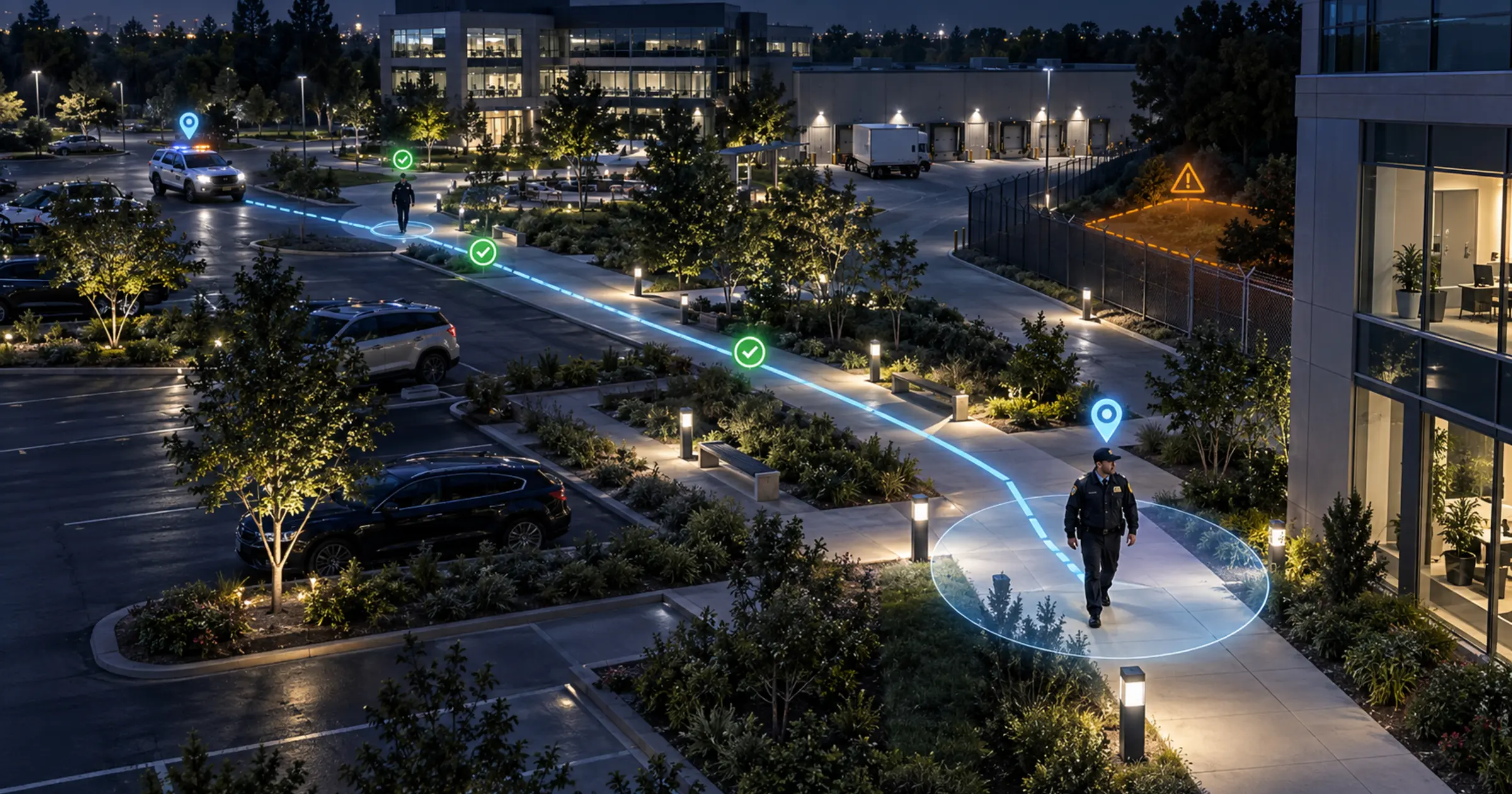
GPS technology provides security supervisors with real-time feedback on where their security team is in proximity to any checkpoints or patrols their guards are conducting.
Using a GPS-enabled device helps determine the route of a guard’s tour in proximity to other guards on tour, something especially useful if there is more than one guard on site. If you are weighing how position data is actually captured, it is worth reading how GPS and geofencing work together for guard tracking.
When a guard is working a graveyard shift, extra attention must be given to those working remotely and in isolation. Constant vigilance is possible when a GPS-enabled device uses lone worker protection.
Lone worker protection is a feature of comprehensive security workforce management. It uses GPS guard tracking to supervise and communicate with remote lone workers at all times, and in TrackTik it runs through the guard mobile app the officer already carries.
The GPS tracking is visualized on a command center map and shows a guard’s exact location in real time. If a lone worker needs help, protection features step in automatically:
- Tilt detection, also called man-down protection, which senses automatically when a guard has fallen
- A manual panic alarm the officer can trigger themselves
- True fall detection
- A danger zone timer for high-risk areas
- The officer’s exact location, available throughout
This ensures that security directors are always connected to a guard’s safety status. If you are reviewing this area more broadly, it is worth asking whether your lone worker safety strategy is keeping pace with current risks.
Ensuring security teams benefit from the right software
Using GPS to track security teams on patrol requires these technologies to work not as separate entities but as a unified whole. Only a system built for corporate security operations can accomplish that.
Here are a few ways security teams can benefit from using GPS to mitigate risks:
- Gain situational awareness over security department happenings
- Know where in-house (or contracted) guards are at all times
- Ensure supervisors can easily track and dispatch guards during critical events
GPS provides real-time feedback on guard location, so supervisors can always know where guards are while also remotely tracking, visualizing, and controlling guard activity. Over time that position history becomes something more useful than a live map: business intelligence turns months of tours, response times and incident locations into the patterns that tell you where your actual risk sits.
What GPS does not solve on its own
It is worth being clear about the limits, because GPS is often sold as though position alone were the outcome. Four things are worth planning for:
- Indoor accuracy degrades. Basements, stairwells, parking structures and large warehouses are exactly where lone workers are most exposed and where GPS is least precise. Checkpoint scans anchor a position where satellite data cannot.
- Connectivity drops. Ask how the app behaves offline, and confirm that positions and reports queue locally with their original time stamps and sync when signal returns.
- Tracking people is a policy question, not just a technical one. Employee monitoring is regulated differently across jurisdictions and is often covered by works agreements or union consultation. Confirm your obligations with your own legal and HR teams before you enable location tracking, and be explicit with officers about what is captured and when.
- A position without a procedure changes nothing. Someone has to be watching, and there has to be a defined response. A map nobody is looking at during a night shift is not a safety control.
None of these are reasons not to use GPS. They are the difference between a live map and a safety programme that holds up when something actually happens.
At Trackforce, we build enterprise security solutions designed to strengthen holistic security across every department. TrackTik is made for security by security professionals, and it brings tracking, tours, incidents and dispatch into one place rather than four.
Looking for a corporate
security solution?
See live officer positions, dispatch the nearest responder, and keep lone workers covered, all from one platform. Walk through it against your own sites and departments. If you are still building the business case, start with the corporate physical security buyer’s guide.
Frequently Asked Questions
Latest Articles





Featured Resources





See Trackforce in action
Book a walkthrough with our team and see how it fits your operation.