
Cada puesto tiene su propia definición de lo que es un buen turno. Ahora tienen una perspectiva diferente.

Trackforce
June 9, 2026 · 7 min read

Cada puesto tiene su propia definición de lo que es un buen turno. Ahora tienen una perspectiva diferente.
Introducing Job-Based Views — five role-specific, live views now available to every TrackTik customer.
Security operations don’t run on one job. They run on five, six, ten different roles, each with a completely different picture of what a good shift looks like, and what a bad one looks like before it becomes a crisis.
Most platforms treat everyone the same. Log in, navigate, click around, piece together the information you need. Then do it again tomorrow.
That works fine if you have one job. But a shift supervisor doesn’t need what a dispatcher needs. A dispatcher doesn’t need what a scheduler needs. And none of them need to spend the first hour of their day hunting for data that should already be in front of them.
That’s the problem Job-Based Views was built to solve.
Why Role-Specific Views Matter in Security Operations
Think about how a shift supervisor actually starts their day. They need to know: who hasn’t clocked in yet, which shifts are still vacant, and who’s already in overtime territory. That’s it. Those three things determine whether the next few hours are manageable or chaotic.
Instead, they’re checking scheduling, cross-referencing attendance, pulling a separate overtime report, and making phone calls to find out what the system should already be telling them. Every manual step is a delay. In a shift-based security operation, a missed arrival becomes a coverage gap, which becomes a client problem in under thirty minutes.
The same is true for every role in the operation:
A scheduler needs to know where today’s coverage is breaking down, not after the shift has started, but while there’s still time to act.
A dispatcher needs a live task queue showing what’s unassigned, what’s aging, and what’s thirty minutes from breaching SLA.
An operations manager needs to know whether patrol tours are actually being completed at every site, right now, not in the end-of-week report.
A director or account manager needs to see incident trends rising across their book of business before a client does.
When everyone is working from the same generic view, none of these people have what they need at the moment they need it. They have data. Data isn’t the same as a decision-ready picture of their day.
What Starting Your Day With the Right Information Actually Changes
There’s a difference between having access to data and having it ready when you open the platform.
When the right information is surfaced for your role the moment you log in, you stop gathering context and start acting on it. You catch problems while they’re still preventable. A vacant shift surfaces two hours before it starts, not after. And the decisions you make are grounded in what’s happening right now, not what was happening when someone last ran a report.
Each view is designed around one operational question: the question that defines whether a given role is ahead of the day or behind it.
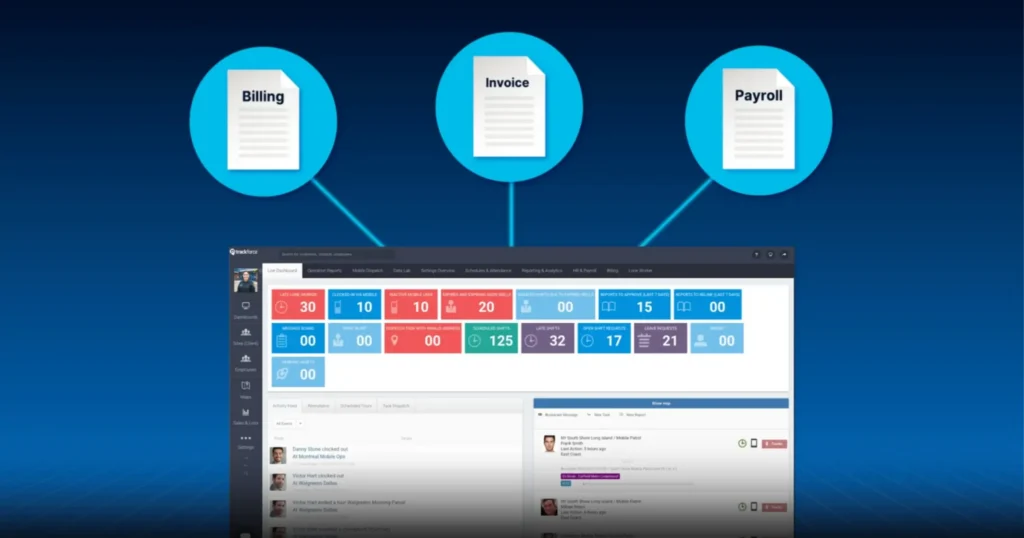
The Shift Supervisor View answers: Who’s late, over OT, or missing right now, before it becomes an incident? It surfaces overtime exposure by employee and account, flags vacant shifts by urgency, and shows late arrivals with elapsed time since expected clock-in.
The Planning & Activity View answers: Where are my coverage gaps and shift exceptions today? Schedulers and planners see a real-time adherence summary, missed starts flagged the moment they occur, same-day cancellations with reason codes, and live shift status across every active site.
The Field Operations View answers: Are my patrol tours actually being completed at every site? Operations managers see scheduled, completed, and incomplete tour counts per site — live — alongside checkpoint compliance rates and non-compliant tours flagged for immediate action.
The Dispatch View answers: What’s unassigned right now and what’s about to breach SLA? The full live task queue is visible with urgency flags, SLA elapsed time color-coded by risk, and a task completion gauge showing overall dispatch performance for the current shift.
The Site Activity Tracking View answers: Are incident volumes rising across my accounts, and what’s unresolved? Directors and compliance teams see total report counts, unapproved reports flagged for immediate attention, report breakdowns by type and severity, and exposure across all sites in real time.
Every view is live. Data refreshes continuously. No manual refresh, no export, no waiting for someone to compile a report.
Available to Every TrackTik Customer — No Additional License Required
Job-Based Views is included for all TrackTik customers. There’s nothing to purchase, nothing to unlock. If your team uses TrackTik, they have access today.
Access is straightforward: Reporting and Analytics → Job-Based Views. Role permissions determine which views appear automatically for each user, so the right person sees the right view without any configuration required on their end.
The data was always there. Now it’s in the right place, for the right person, at the right time.
Ready to see your operation in real time? Log into TrackTik and navigate to Reporting and Analytics → Job-Based Views.
For questions, contact your Customer Success Manager or visit https://support.tracktik.com/
Preguntas frecuentes
Artículos relacionados


Artículos destacados
Reflexiones y consejos del profesorado de Spear y de expertos del sector