Here’s Why Security Workforce Management Software Is Vital To Providing Better Security Services

Trackforce
February 20, 2019 · 9 min read
Security companies are on a never-ending quest for operational efficiency, and the pressure only grows as margins tighten and clients expect more proof of service. That’s why having a rock-solid security workforce management solution is vital.
The right solution can help your company in a variety of ways. Your security operations will become more efficient and your officers more productive, all while making your company more competitive and maximizing your bottom line. Here’s a closer look.
Key takeaways
- Workforce management software pays for itself through efficiency.
Less admin time, controlled overtime and accurate billing protect margins, even though the software is not a revenue tool. - Faster response protects assets.
Real-time visibility lets you send the closest available officer the moment something happens. - Compliance and scheduling get easier at scale.
One system keeps multi-site operations organized as rules, contracts and coverage needs change. - Security providers and in-house teams both win.
Providers compete on accountability and efficiency, while in-house teams get the data to justify and grow their budgets. - TrackTik brings it all together.
Scheduling, field operations, billing and analytics run from the same data in one platform.
What is security workforce management software?
Security workforce management software is a platform that helps security companies and in-house security teams plan, run and prove their operations from one system. It replaces the spreadsheets, paper logs and disconnected apps that most teams start with, and gives managers real-time visibility across every site.
A complete platform typically covers:
- Scheduling and time capture: building shifts, tracking attendance and controlling overtime.
- Guard tours and patrols: verifying that checkpoints are covered on schedule.
- Incident and daily activity reporting: capturing what happened, with photos and GPS location.
- Dispatch: sending the right officer to the right place quickly.
- Billing and payroll: turning verified hours into accurate invoices and pay.
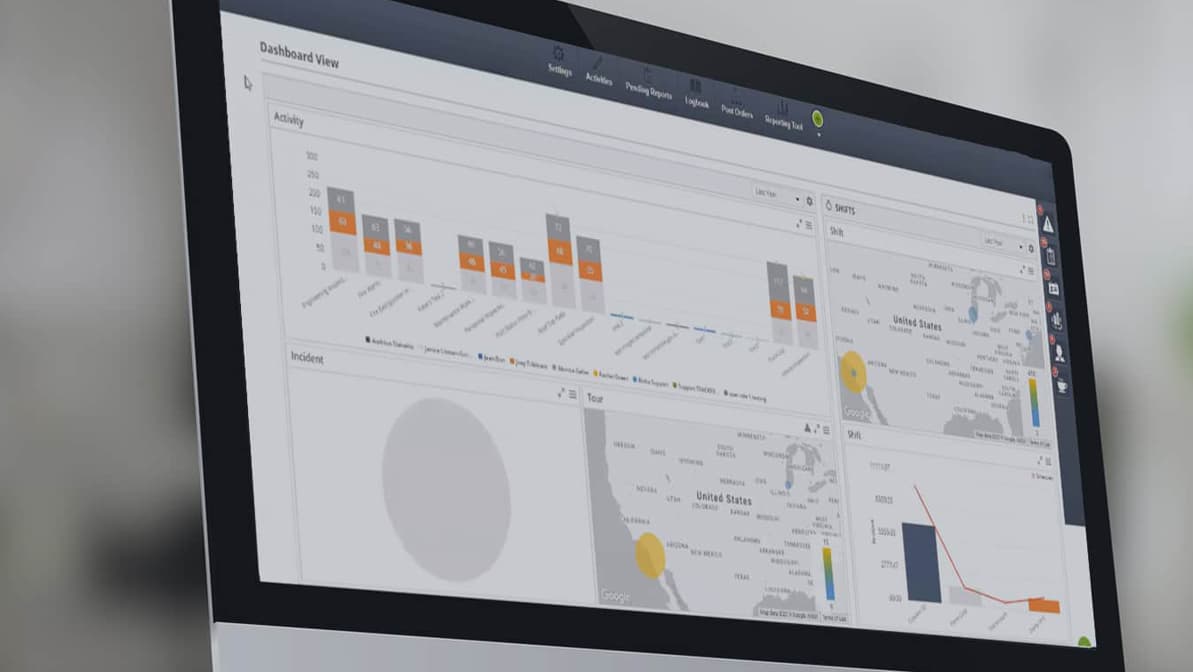
- Analytics and client reporting: dashboards that prove the value of the work.
How does guard management software improve the bottom line?
A solid security workforce management platform can help your company maximize its efficiency and positively impact your profit margin. While it isn’t designed to bring in more revenue, making workforce management software part of your overall security operations can pay off in spades when it comes to maximizing your profit.
With the right solution, a company can drastically decrease the response time of its security team to potential threats. That translates into potentially heavy savings in the form of recovered and protected assets.
Where the savings come from
Here is how day-to-day work changes once operations run on one platform:
| Area | Without workforce management software | With TrackTik |
|---|---|---|
| Scheduling | Spreadsheets rebuilt every week, with gaps found too late | Live scheduling with repeatable templates and alerts for coverage gaps |
| Overtime | Discovered after payroll runs | Flagged before an officer crosses the threshold |
| Proof of service | Paper logs and memory | GPS-verified tours, checkpoints and time-stamped reports |
| Incident response | Phone trees and radio calls | The closest available officer dispatched from one screen |
| Billing | Hours re-keyed from timesheets into invoices | Invoices generated from verified hours worked |
| Client visibility | Monthly reports assembled by hand | Dashboards and reports shared through a client portal |
What can I do with reporting, analytics and other features?
Guard management software allows you to create an easy-to-follow workflow of all security measures and activities across multiple client sites.
Professional compliance standards, especially in highly sensitive fields such as healthcare, are constantly changing. A comprehensive system helps your company keep up with those ever-changing compliance standards that impact your clients’ industries.
With a distributed workforce, security workforce management software is vital to staying organized so resources are managed effectively. It can also help you properly schedule shifts, control overtime, and act immediately when shift coverage issues arise.
Related guide: A Comprehensive Guide to Finding the Best Security Guard Management Software walks through the seven factors to weigh before you choose a platform.
How can this make me more competitive?
For security providers
If you run a security firm, this technology increases your officers’ accountability, reduces your response time and maximizes your staffing efficiency. Verified patrols and professional reports also give you evidence to win renewals and bid confidently against larger competitors.
For in-house security teams
If you run enterprise security or employ a security firm, a security workforce management solution gives you insight into the service being provided and helps you justify your budget, or even increase it, with data to support it.
Either way, you can provide the most security for your money. That means protecting assets and people for much less than it costs to operate without any software in place.
Signs your security operation has outgrown spreadsheets
Not sure whether it is time to invest? Watch for these warning signs:
- Schedules live in spreadsheets that only one person fully understands
- Supervisors spend hours chasing timesheets and reports
- Non-billable overtime shows up after payroll, not before
- Clients ask for proof of patrols that you cannot easily provide
- Incident reports arrive late, incomplete or handwritten
- Invoices need manual corrections before they go out
- Adding a new site means adding administrative headcount
If three or more of these sound familiar, it is time to look at a platform. Our breakdown of the 6 benefits of security workforce management software shows what changes when you make the switch.
How TrackTik delivers these benefits
TrackTik, the security workforce management platform from Trackforce, connects the field and the back office in one system:
- Scheduling and time capture: live scheduling, shift management and time capture that flow straight to payroll.
- Field operations: the TrackTik guard tour app gives officers guard tours, incident and daily activity reports, and lone worker protection on their mobile device.
- Billing: contracts and invoicing generate accurate invoices from the operational data your teams already produce.
- Analytics: business intelligence dashboards and custom KPIs, with connections to tools like Tableau, Power BI and Looker Studio.
- Integrations: connections to payroll and accounting platforms such as ADP, QuickBooks and Sage Intacct.
How to start implementing guard management tools
Getting started with a holistic approach to security in your organization has never been easier. Follow these steps for a smooth rollout:
- Map your current processes. List the spreadsheets, apps and paper forms your team relies on and where time is lost.
- Set measurable goals. For example, reduce non-billable overtime, speed up incident response or shorten your billing cycle.
- Start with a pilot. Roll out to one or two sites first so you can fine-tune before scaling.
- Configure around your contracts. Set up schedules, tours, post orders and report templates for each client.
- Train supervisors first. Supervisors who champion the system make officer adoption much easier.
- Share results early. Show clients the new reporting from day one, then expand to the rest of your sites.
Want to avoid the most common mistakes? See why security software implementations fail and how to avoid the top five pitfalls.
When you are ready, contact Trackforce to schedule a free TrackTik consultation. We’ll review your specific security needs and support you in modernizing your security guard operations.
Frequently Asked Questions
Latest Articles





Featured Resources





See Trackforce in action
Book a walkthrough with our team and see how it fits your operation.
See what TrackTik can do for your operation
Book a demo to see how TrackTik scheduling, guard tours, billing and analytics work together for your sites and clients.