Corporate Badge Access and HR System Integrations for Security Software: A Buyer’s Guide

Trackforce
October 21, 2026 · 6 min read

Quick answer: Badge access and HR system integrations connect your security software to the systems that already know who is on site and who works for you. Badge data confirms presence. HR data confirms role, status, and credentials. Together they give in-house security teams accurate coverage, faster incident reports, and cleaner audit trails without manual data entry.
What Are Badge Access and HR System Integrations for Security Software?
A badge access integration links your access control system, including door readers and credential records, to your security operations software. An HR integration links employee records, schedules, and payroll data to that same software.
Your security operations platform is where the two meet. It turns raw door events and employee records into reports, alerts, and decisions your team can act on.
Why Do In-House Security Teams Need These Integrations?
Most corporate security programs run on disconnected tools. Access control lives with facilities. Employee data lives with HR. Incident notes live in email, spreadsheets, or a legacy log.
That gap creates three problems:
- Slow reconciliation. Analysts spend hours matching badge events to people and shifts.
- Stale access. When HR updates a role or ends employment, access data can lag behind.
- Thin incident context. Reports describe what happened but not who was credentialed to be there.
Leadership also wants proof that security spend works. Connected data makes that case easier within a security software system. Our guide on how to justify security software costs shows how to frame it for executives.
What Data Should Flow Between Your Systems?
Start with the data that supports your highest-risk decisions. A practical map looks like this:
| Source system | Key data | Security use |
|---|---|---|
| Badge access control | Door events, denied attempts, credential status | Verify presence, trigger incident review |
| HR system | Hires, role changes, departures, department | Confirm eligibility, support access reviews |
| Scheduling and payroll | Shifts, hours, attendance | Track coverage and labor cost |
| Security operations software platform | Incidents, patrols, reports, trends | Build the audit trail and board reporting |
How Do Badge Access Integrations Improve Incident Reporting?
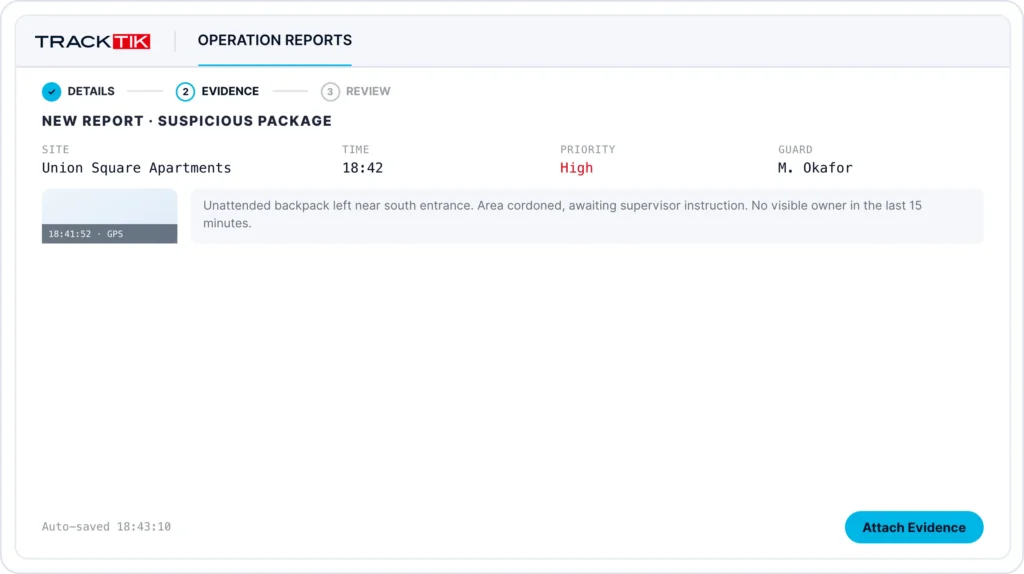
Badge data gives every report a factual anchor. Picture repeated denied attempts at a restricted floor after hours. An officer on patrol can open the security incident reporting workflow in the mobile app and capture the details on the spot. The report can reference the access events, so reviewers see the full picture without chasing logs.
Strong incident reporting software should give you:
- Structured mobile reports that officers complete in the field, with consistent fields every time
- Approval workflows so supervisors review and sign off before reports reach legal or compliance
- Trend analysis that shows where incidents cluster by site, time, and type
- AI-assisted writing through ReportPro AI, available in the TrackTik platform from Trackforce, helps officers produce clear, complete narratives faster
Better reports mean fewer follow-up questions and stronger evidence when an investigation starts. For a deeper look at selection criteria, read our guide to choosing security incident reporting software.
How Do HR System Integrations Support Security Operations?
HR integrations keep people data accurate without double entry. When your security software syncs with your HR and payroll tools, field hours flow straight to pay with no exports and no rekeying.
TrackTik offers direct connections to HR and payroll partners including ADP, Criterion, and Paycor. Those syncs support people management and guard management, including scheduling, attendance, and credential tracking.
For in-house teams, the result is a current roster, fewer payroll errors, and a clear link between who is scheduled, who is on site, and who filed each report.
How Does TrackTik by Trackforce Connect to Your Stack?
TrackTik is the system of record for your security program. It is built so you own your data and can connect it to the tools your company already runs.
Here is what that looks like in practice:
- Open REST API and real-time webhooks to connect TrackTik to access control, HR, ticketing, and other systems in your environment
- Data replication into your warehouse, BI, and GRC tools
- Role-based access and audit logging to control who sees what
- Sandbox environment and integration support so you can test before you go live
- Compliance credentials including SOC 2 Type II, ISO 27001, and GDPR, detailed on our Trust and Compliance page
You can browse the full integrations directory to see current partners.
What Should You Ask Before You Buy?
Use these questions in vendor conversations when you’re evaluating technology partners for your access control and HR security needs:
- Which badge and access control systems do you support, and how? Ask whether the connection is a native integration, a partner connector, or API based.
- Which HR and payroll systems sync today? Confirm direction of sync, frequency, and field mapping.
- Is there an open, documented API? You will want one for systems outside the standard list.
- How is access controlled and logged? Look for role-based permissions and audit trails.
- Who owns the data? You should be able to export and replicate it.
- What does implementation involve? Ask about data migration, training, and timelines.
Custom demo
Connect Your Security Data in One Place
Badge access and HR integrations turn separate records into one reliable picture of your security program. That means better reports, stronger audits, and a clearer story for leadership.
See how TrackTik by Trackforce maps to your sites, systems, and teams. Get a demo and we will walk through your stack in 30 minutes.
Frequently Asked Questions
Latest Articles





Featured Resources




See Trackforce in action
Book a walkthrough with our team and see how it fits your operation.