Transform Your Security Operations from Reactive Reporting to Proactive Risk Management

Trackforce
February 28, 2025 · 11 min read

Transform Your Security Operations from Reactive Reporting to Proactive Risk Management
Operational efficiency and scalability are no longer just aspirations. They are necessities. Are you struggling to standardize processes across multiple client sites? Are you finding it difficult to get a holistic view of your security operations? Or perhaps you are grappling with the challenge of ensuring guard accountability, especially when unexpected events disrupt planned tasks.
If these challenges sound familiar, TrackTik, the security workforce management platform from Trackforce, has a game-changing solution: Site Tasks.
We understand the hurdles security teams face in managing their clients’ diverse needs. That’s why TrackTik reimagined task management with Site Tasks, a powerful module designed to change how you operate, report and grow.
Key takeaways
- Incident reports only tell half the story.
They show what went wrong, not the routine checks and inspections that keep problems from happening in the first place. - Proactive work needs structure to count.
Standardized job types turn perimeter checks, safety inspections and lockups into consistent, reportable tasks across every site. - Accountability depends on real-time visibility.
When a task is at risk, supervisors can see it and reassign it before it is missed, not after. - Standardization is what makes growth scalable.
New clients go live faster when proven job types can be deployed instead of rebuilt. - Proof of prevention wins renewals.
With TrackTik Site Tasks, every task has an owner, a status and a timestamp, so you can show clients the proactive value they are paying for.
Reactive vs. Proactive Security Operations: What’s the Difference?
Most security operations do both kinds of work every day. The difference is which one gets recorded, measured and shown to the client. Use this comparison to see where your operation sits today.
| Area | Reactive operations | Proactive operations |
|---|---|---|
| Primary record | Incident reports filed after something goes wrong | Scheduled checks, tasks and tours, plus incidents |
| Client visibility | A summary at month end or when a client asks | Reports and dashboards available on demand |
| Risk handling | Respond after the event | Spot trends and fix issues before they escalate |
| Accountability | Assumed unless a problem surfaces | Every task has an owner, a status and a timestamp |
| Growth | Each new site is set up from scratch | Standard job types are deployed across sites |
Challenges with Scalable Business Growth
Traditional security operations often suffer from a lack of standardization. Each client site operates independently, with unique tours, tasks, and reporting structures. This siloed approach can create limitations:
- Reporting challenges: Comparing client performance and identifying improvement areas can be difficult. Non-standardized tasks can make reporting overwhelming, while standardization provides straightforward, actionable insights.
- Hindered business growth: When processes aren’t standardized, growing your business becomes difficult. You’re constantly reinventing the wheel, hindering your ability to expand efficiently.
Relying solely on incident reporting provides an incomplete picture of your value. How do you demonstrate the proactive risk mitigation your security teams carry out every day, such as routine checks, safety equipment inspections, perimeter controls and server room monitoring? Without a structured way to capture these activities, you miss a crucial opportunity to showcase your full service offering.
The Solution: Site Tasks for Standardization, Accountability and Unified Task Management
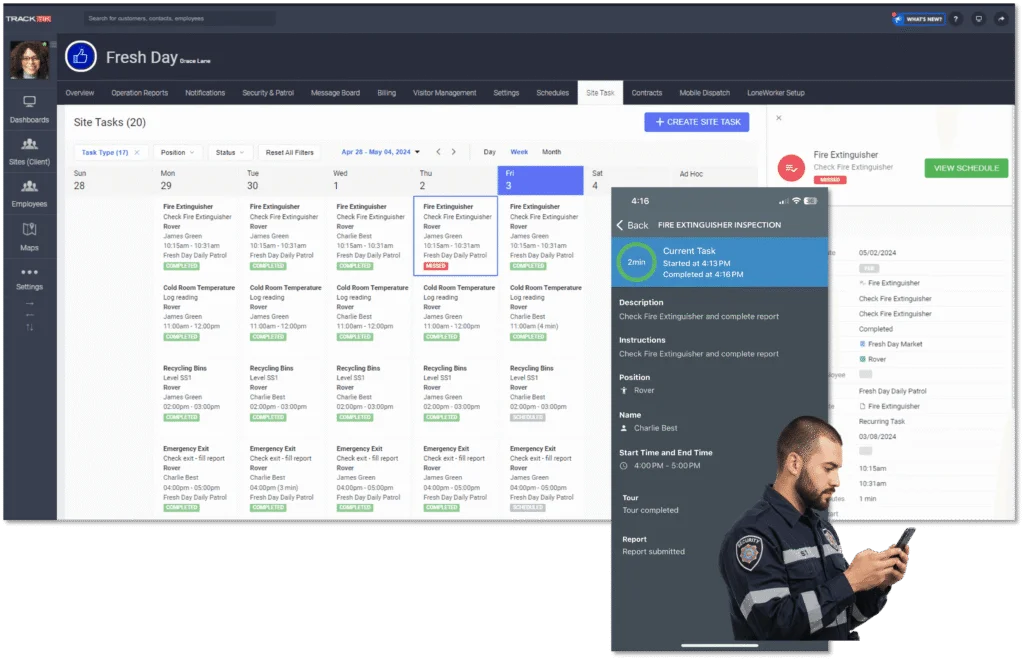
Site Tasks addresses these challenges head-on with a new approach to task management inside TrackTik Security Operations. It offers a centralized system for creating and deploying standardized job types across client sites. For a closer look at the feature itself, see TrackTik’s Site Tasks, up close.
1. Job Type Standardization
With Site Tasks, you can define standardized job types at headquarters and apply them across multiple customer sites and runsheets. For example, instead of recreating “Lock Doors” and “Close Windows” for every new client, you can create these as standard jobs and quickly deploy them across all relevant sites.
This standardization unlocks several key benefits:
- Faster customer setup: Eliminate redundant work and accelerate onboarding for new clients.
- Holistic reporting: Aggregate data across all customers, job types and sites to gain a complete view of your operations. With TrackTik Business Intelligence, you can identify trends, optimize resource allocation and improve overall service delivery.
2. Live Security Guard Tracking and Enhanced Accountability
In the real world, security operations are rarely predictable. A mobile patrol officer might get a flat tire on the way to a site, or an on-site security guard might face an emergency. In these situations, accountability and responsiveness are paramount.
Site Tasks empowers you with:
- Real-time visibility: Track your guards’ locations and task completion status.
- Dynamic task reassignment: Seamlessly reassign tasks from mobile security guards to static guards or postpone unfinished tasks to a supervisor or the next security guard on shift.
Site Tasks ensures that critical tasks are never left undone, even in unforeseen circumstances.
3. Unified Task Management
Site Tasks breaks down the barriers between mobile and static guarding services. Connecting all your guards around standardized jobs can streamline scheduling, improve communication, and enhance overall team coordination.
4. Planned and Unplanned Work in One Record
Not every task fits neatly on a tour schedule. Site Tasks captures the rest of the work, too:
- Scheduled or on the fly: Plan tasks in advance or create one the moment a client calls with a request.
- Tied to assets: Link tasks to specific equipment or locations, and pair them with TrackTik Asset Tracking for a full maintenance and inspection history.
- Complete documentation: Officers can complete required reports with custom fields, capture signatures and add comments from the mobile app.
- Instant supervisor updates: Supervisors are notified the moment a task is finished.
What Proactive Risk Management Looks Like on a Real Site
Proactive risk management is a repeatable cycle, not a one-time project. Here is how a security operation can put it into practice with TrackTik.
- Assess the risks. Start with a site risk assessment. These intelligence gathering tools for security risk assessments help you identify what the property actually faces.
- Turn risks into standard job types. Convert each risk into a clear task with a description, required fields and the posts responsible for it.
- Schedule the work. Assign tasks to runsheets and link them to a TrackTik security guard tour system so checks happen at the right time and place.
- Respond to exceptions in real time. When a task reveals a problem, escalate it through the TrackTik Command Center and document it with ReportPro AI for clear, compliance-ready reports.
- Review and adjust. Look at trends across tasks and incidents every month, then update job types as risks change. The guide A Data-Driven Defense shows how to turn that data into foresight.
Proactive Security Tasks Worth Standardizing
Start with the checks your officers already perform but rarely get credit for. Each one becomes a timestamped record when it runs as a Site Task.
| Task | Why it matters | Evidence to capture |
|---|---|---|
| Fire and safety equipment checks | Confirms extinguishers, exits and alarms are ready when needed | Photo, condition notes and timestamp |
| Perimeter and fence line inspection | Finds damage or gaps before someone exploits them | GPS location, photos and comments |
| Door and window lockup | Prevents after-hours access and theft | Completion time and exceptions found |
| Server or equipment room check | Protects critical systems and data | Custom fields for temperature, access and condition |
| Lighting and camera walk | Keeps dark spots and blind spots from growing | Asset ID, issue type and photo |
| Slip, trip and hazard walk | Reduces liability and injury risk | Hazard description and follow-up owner |
Is Site Tasks Right for Your Security Operation?
Ask yourself these questions:
- Are you serving a large volume of clients or anticipating near-term growth?
- Are you currently supporting both mobile security guards and on-site guards?
- Are your security teams held accountable for task completion?
- Are you showing your clients the value you provide for proactive risk management?
If you answered yes to any of these questions, Site Tasks in TrackTik can help.
How to Prove Proactive Value to Clients
Clients rarely see the work that prevents problems. Site Tasks changes that by rolling every activity into one report you can share for any timeframe, and the TrackTik client portal gives customers real-time access to reports and operational overviews. That is the fastest way to build client trust by letting them see for themselves.
Bring these numbers to every quarterly business review:
- Task completion rate by site and by job type
- Issues found and resolved through proactive checks before they became incidents
- Ad hoc request volume, since repeated requests your team handles for free are often a service line waiting to be quoted
Ready to Transform Your Security Operations?
Site Tasks is more than a software module. It is a strategic investment in the future of your security operations. By standardizing processes, enhancing accountability and unifying task management, Site Tasks empowers you to:
- Scale your business: Expand your operations efficiently and profitably.
- Improve service delivery: Provide consistent, high-quality service across all client sites.
- Demonstrate your value: Showcase the proactive risk mitigation efforts that differentiate you from the competition.
Ready to see it on your own sites? Book a TrackTik demo and the team will walk you through Site Tasks and the reporting that goes with it.
Frequently Asked Questions
Latest Articles





Featured Resources





See Trackforce in action
Book a walkthrough with our team and see how it fits your operation.